WINDOW
ADJUSTMENT
page29
In PC mode you have to set the Windows system firstly as below.
NOTE: If the PC resolution is set higher than what is listed on the chart, the monitor will display a
black screen. The effect will be optimum when the freguency you selected is 60Hz.
Setup your PC software
……
Even if your actual display-setting screen looks different from the windows below, basic setup
methods will be applied in most of the case.
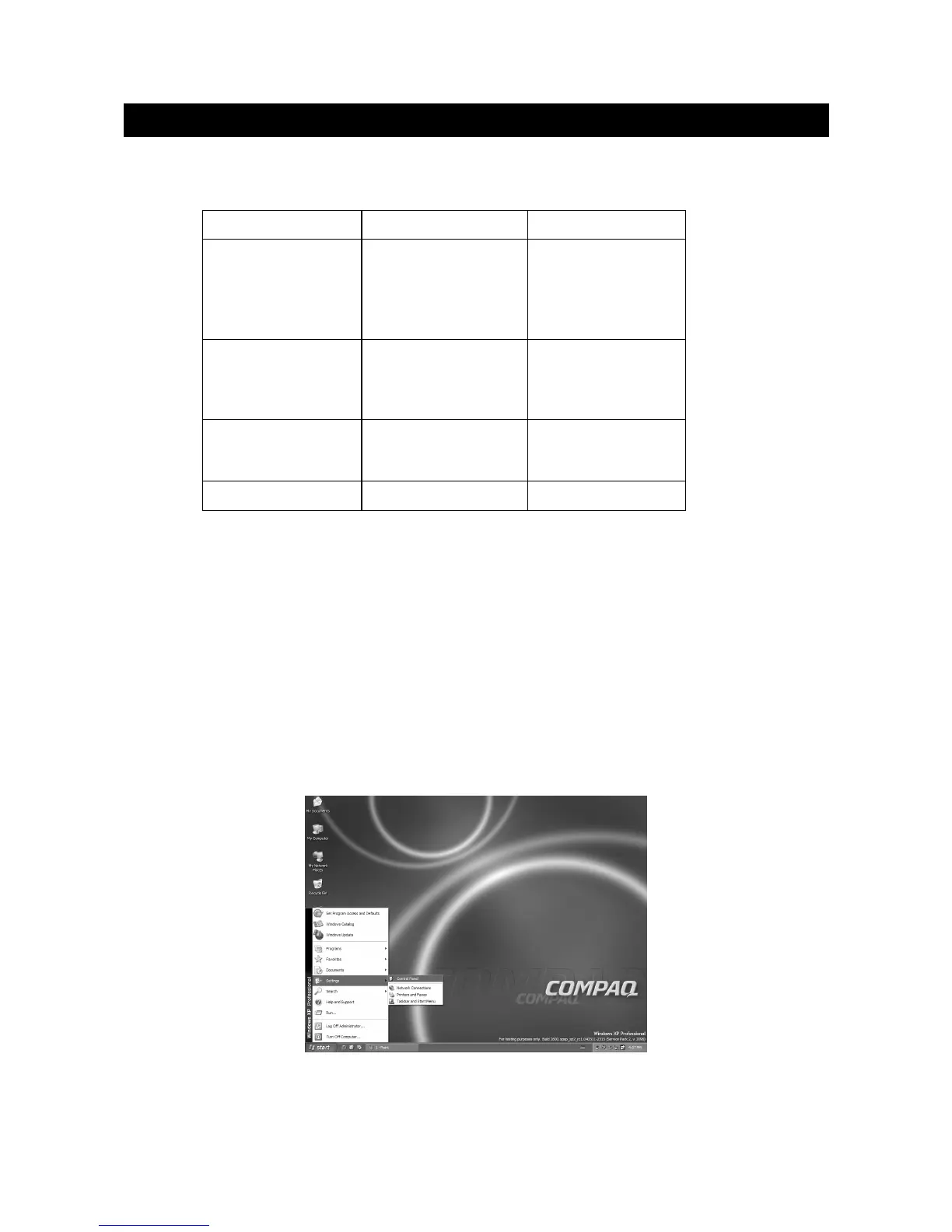
1. First, click on "Setting" on the Windows Start menu .While "Setting" is selected , move the
cursor to submenu "Control panel".
Resolution
VGA
SVGA
XGA
WXGA
640
×480
640×480
640×480
800×600
800×600
800×600
1024×768
1024×768
1024×768
1280×768
60
70
75
60
60
75
72
60
72
75
Freq. (Hz)


 To Next Page