MIO Alpha User Guide 07
heart rate Zone alert led sIgnals
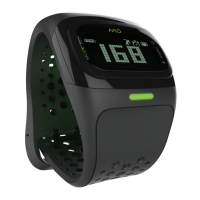
With your Alpha in EXERCISE mode and the timer on, the LED light below the watch displays alerts.
Green flash: you are exercising in your target heart rate zone.
Red flash: you are exercising above your upper limit. A double-flash means your heart rate is 10 BPM
or more outside the target zone.
Blue flash: you are exercising below your lower limit. A double-flash means your heart rate is 10
BPM or more outside the target zone.
Using The Timer
Turn on the timer while you are exercising to:
• Track the length of time you have been exercising.
• Turn on heart rate zone alerts.
Your watch must be in EXERCISE mode to use the timer.
to turn on the tImer
• With your watch in EXERCISE mode, press the TIMER button. The display says START.
• Press the TIMER button to Pause/Resume the TIMER. Once the TIMER is running, the HR Zone
alrert will be activated.
to exIt from tImer
• Press and hold the TIMER button until the display says END.
Turning off the timer also turns off EXERCISE mode.
to VIeW the elapsed tIme on the tImer
• Press the SET button.
• Press the SET button again to toggle the display from timer to time to heart rate.
Reviewing Your Exercise Session
Your Alpha exercise log shows:
• The length of time of your last exercise session (assuming that the timer was running for your
entire session).
• Your average heart rate during the last exercise session.
• The amount of time you spent in your target heart rate zone in the last exercise session.


 To Next Page