31
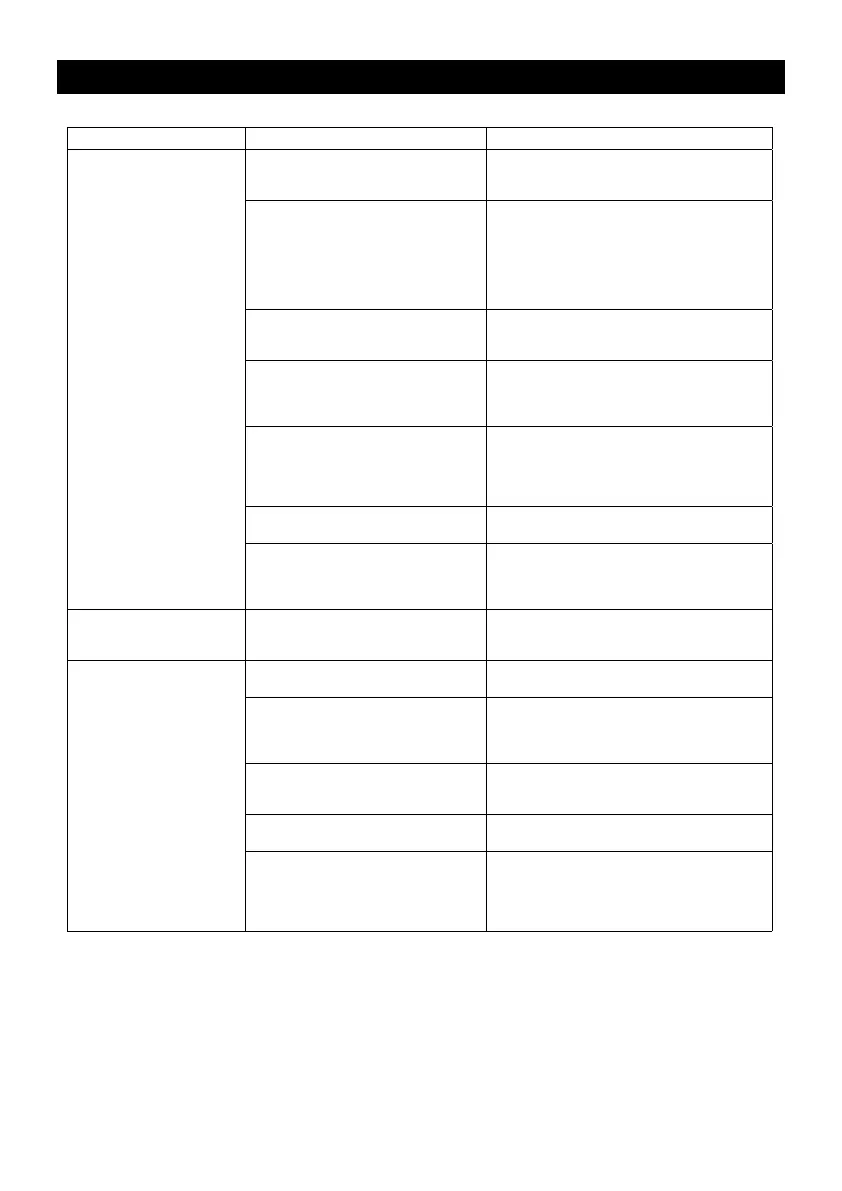
Symptom Possible Cause Solution
Low power and/or low free
speed.
Insucient air pressure. Check air line pressure at the Inlet of the Sander
while the tool is running at free speed. It must be
6.2 Bar (90 psig/620 kPa).
Clogged Muer(s). See the ”Housing Disassembly“ section for Muer
removal. The Item 37 Muer can be back ushed
with a clean, suitable cleaning solution until all con-
taminates and obstructions have been removed.
If the Muer can not be properly cleaned then
replace it. Replace Item 38, Muer Insert (See the
”Housing Assembly“ Section).
Plugged Inlet Screen. Clean the Inlet Screen with a clean, suitable
cleaning solution. If the Screen cannot be cleaned,
replace it.
One or more worn or Broken Vanes. Install a complete set of new Vanes (all vanes must
be replaced for proper operation). Coat all vanes
with quality pneumatic tool oil. See ”Motor Disas-
sembly“ and ”Motor Assembly“.
Internal air leakage in the Motor Housing
indicated by higher than normal air con-
sumption and lower than normal speed.
Check for proper Motor alignment and Lock Ring
engagement. Check for damaged O-Ring in Lock
Ring groove. Remove Motor Assembly and rein-
stall the Motor Assembly. See ”Motor Disassembly“
and ”Motor Assembly“.
Motor parts worn. Overhaul Motor. Contact authorized Mirka Service
Center.
Worn or broken Spindle Bearings Replace the worn or broken Bearings. See ”Shaft
Balancer and Spindle Disassembly“ and ”Spindle
Bearings, AirSHIELD™ and Shaft Balancer As-
sembly“.
Air leakage through the Speed
Control and/or Valve Stem.
Dirty, broken or bent Valve Spring, Valve
or Valve Seat.
Disassemble, inspect and replace worn or dam-
aged parts. See steps 2 and 3 in ”Housing Disas-
sembly“ and steps 2 and 3 in ”Housing Assembly“.
Vibration/rough operation.
Incorrect Pad. Only use Pad sizes and weights designed for the
machine.
Addition of interface pad or other material. Only use abrasive and/or interface designed for the
machine. Do not attach anything to the Sanders
Pad face that was not specically designed to be
used with the Pad and Sander.
Improper lubrication or buildup of foreign
debris.
Disassemble the Sander and clean in a suitable
cleaning solution. Assemble the Sander. (See
”Service Manual“.)
Worn or broken Rear or Front Motor
Bearing(s).
Replace the worn or broken Bearings. See ”Motor
Disassembly“ and ”Motor Assembly“.
For vacuum machines it is possible to
have too much vacuum while sanding on a
at surface causing the pad to stick to the
sanding surface.
For DB machines add extra washer(s) to the pad
spindle to increase the gap between the pad and
shroud. For CV machines reduce vacuum through
the vacuum system and/or add extra washer(s)
to the pad.
Troubleshooting Guiide
DOC A3048 Rev 06/07/22


 To Next Page