N
M
L
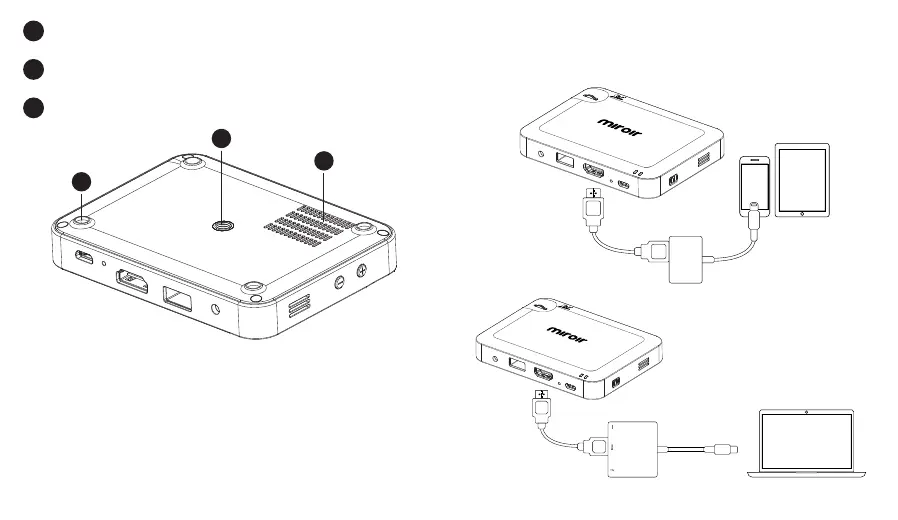
Rubber Foot Pads - Provides stability and proper airflow to
cooling vents.
Tripod Mount - Will fit a standard sized tripod screw. Tripod
not included.
Cooling Vent - IMPORTANT: Do not cover or block airflow to
the vent.
L
M
N
Learn More
To learn more about your Miroir Micro Projector and
its operations, to review specs, and find answers to
frequently asked questions,
please visit: www.miroirusa.com
Connect Your Apple Products
To connect your Apple device to a Miroir projector, you will need
an Apple Digital AV Adapter (sold separately) and an HDMI cable
(included in the box).
To connect your Macbook
you will need an Apple USB-C
Digital AV Multiport Adapter
(sold separately) and an HDMI
cable (included in the box).
AUDIO
HDMI
USB 5V OUT
Micro USB Power
Reset
HDMI Cable
(Included)
Apple Lightning
Digital AV Adapter
(Sold separately)
Apple USB-C
Digital AV
Multiport Adapter
(Sold separately)
AUDIO
HDMI
USB 5V OUT
Micro USB Power
Reset
HDMI Cable
(Included)
AUDIO
HDMI
USB 5V OUT
Micro USB Power
Reset


 To Next Page