Using the Replay feature
Use Advanced PIP
_" Current setting :
Replay
Replay speed : 1
Use ADJUST to select.
Then press ENTER.
Press MENU to return to
Customize Viewing Menu.
Use Advanced PIP
Current setting:
Replay
Replay speed : 1
Use ADJUST to select.
Then press ENTER.
Press MENU to return to
Customize Viewing Menu.
ooo_
OOOU
ooo_
0
0
0
0
Select "Use Advanced :PIP" in the
"Customize 'viewing" menu; then,
set the current setting to "Re-
play." (See "Selecting the ad-
vanced P]:P _unctions," page 54.)
Set the replay speed between 1
(short interval) and 9 (long
interval).
Use the MENU button to return
to the normal picture.
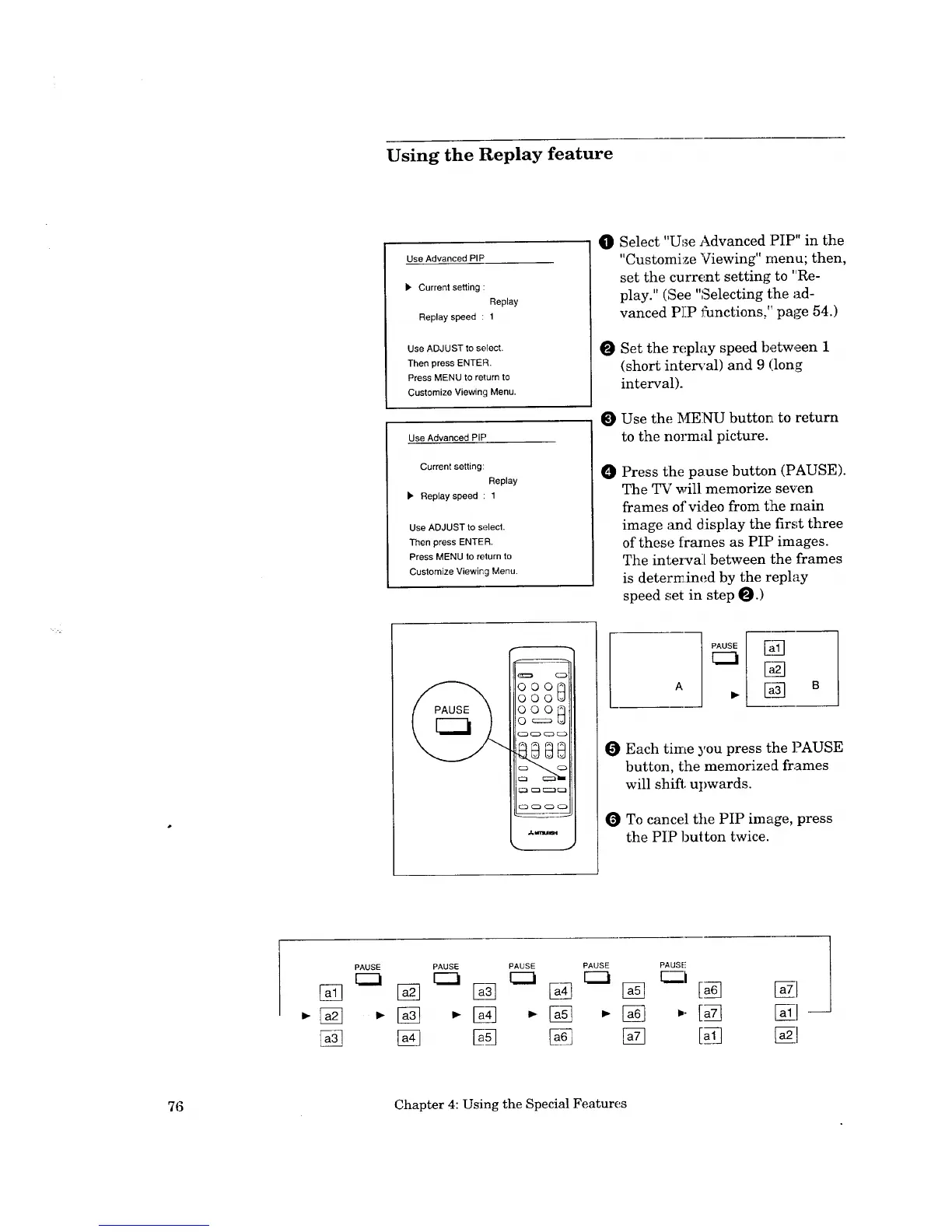
Press t:he pause button (PAUSE).
The TV will memorize seven
frames of video from the main
image and display the first three
of these frames as PIP images.
The inteI_cai{ between the frames
is determined by the replay
speed set in step _.)
E_
_N
Each time you press the PAUSE
button, the memorized frames
will shift, upwards.
To cancel the PIP image, press
the PIP button twice.
[]
PAUSE PAUSE PAUSE PAUSE
C2_
PAUSE
F.._.j
[a_
[] • []
[] []
76 Chapter 4: Using the Special Features


 To Next Page
 Loading...