ENGLISH
Installation
ATAPI CD-ROM
26
Before an ATAPI CD-ROM can be connected to an IDE or EIDE interface, it
must be configured as „Master“ or „Slave“. This is done by setting the jumpers
at the back of the unit.
Warning: Please turn off all equipment and disconnect the computer power
cord from the mains socket before you carry out the installation described
below.
Setting the configuration jumpers
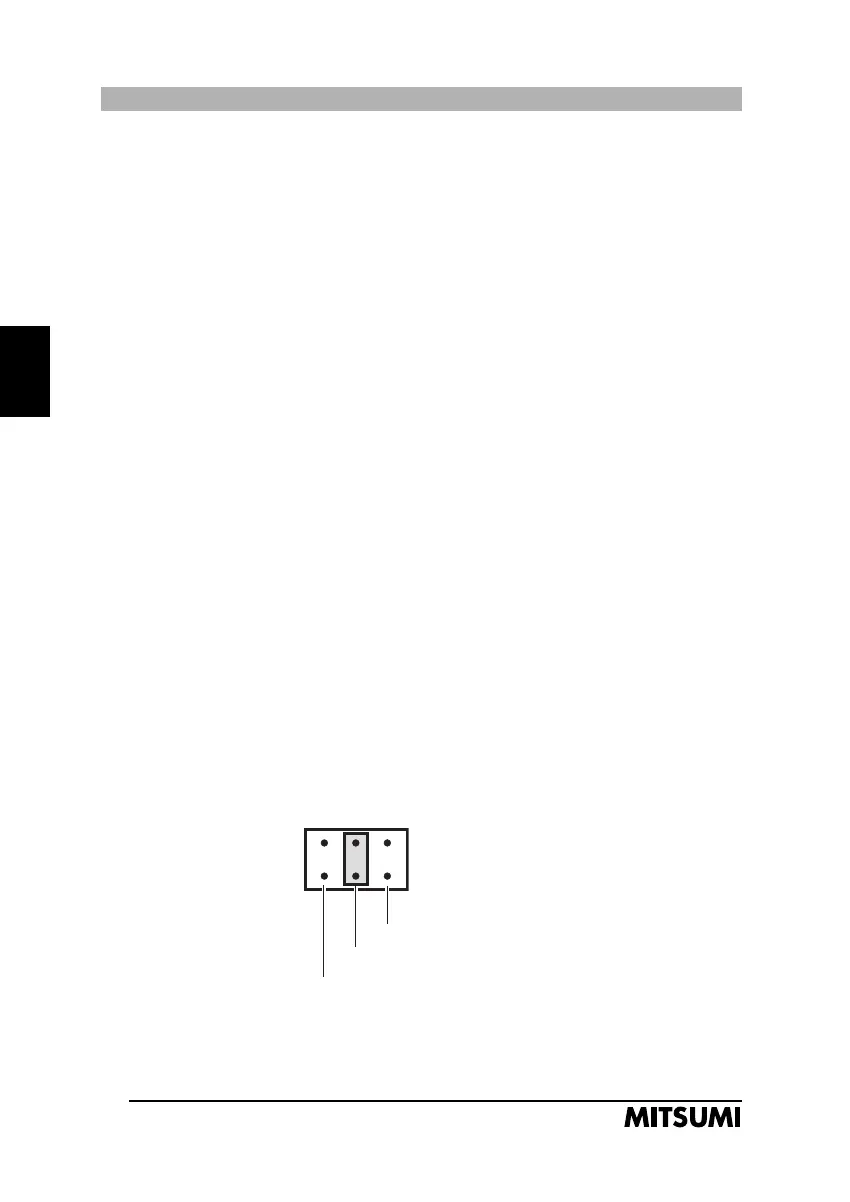
A jumper must be placed in one of the three following positions:
SL - Slave
This is the default setting. The jumper must be set here if your drive is to be
operated as a slave, i.e., if you connect it on the same ribbon cable as an exi-
sting hard disk drive. In some cases the jumper setting of the hard disk drive
must be modified, too. It must be jumpered as „Master, slave present“.
MA - Master
This setting is used if the drive is operated as a master device, i.e. stand-alone
with its own ribbon cable, or in combination with a second CD-ROM drive,
jumpered as „Slave“.
CS - Cable Select
Use this setting only if you are connecting your CD-ROM drive to an exchan-
geable hard disk drive and if you have the necessary ribbon cable.
The following illustration shows an example in which the jumper is set to
„Slave“.
MA (Master)
SL (Slave)
CS (Cable select)
FX2400.2 20.10.2000 10:05 Uhr Seite 26



 To Next Page