EasyManua.ls Logo

Mobi Technologies Cam Multi-Purpose - Reset MobiCam Device; Procedure for Resetting Device; Enter Wi-Fi Credentials; Wi-Fi Details Entry

Mobi Technologies Cam Multi-Purpose
11 pages
Print Icon
To Next Page IconTo Next Page
To Previous Page IconTo Previous Page
Loading...
www.getmobi.com
(877)-662-4462 .
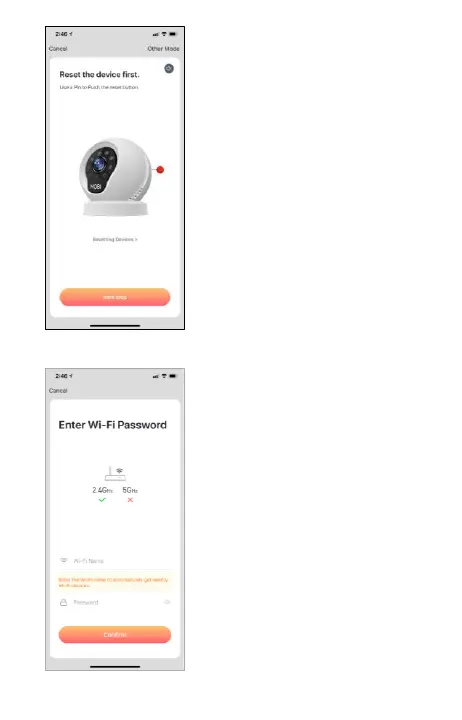
Enter your 2.4GHz WiFi name
and password. Your WiFi
name and password are case,
space, and number sensitive.
Then tap “Confirm”.
ENTER WIFI
Plug in your MobiCam and
reset your device, In-app will
show you how to reset your
MobiCam. Tap “Next Step”
once it resets.
RESET DEVICE

Related product manuals