13
MOBIUSTRIMMER.COM
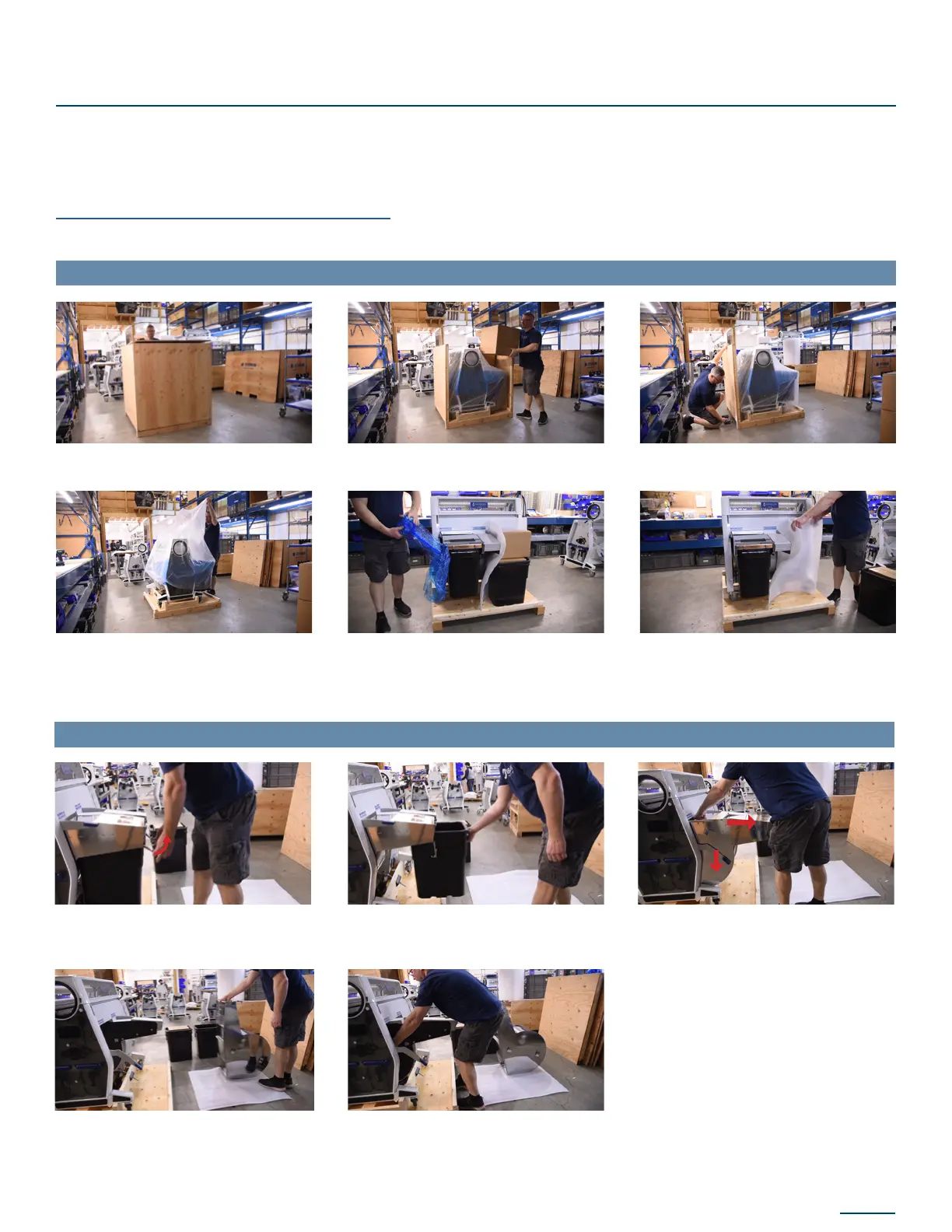
1. Remove the crate lid and 1 side panel
4. Remove protective plastic from M108S
and retain for future use
7. Pull up on levers holding the installed
trim tote and rotate them downwards
10. Place hand in the gap to support the
weight of the separator and pull it the
rest of the way out Place separator on
foam sheet
5. Remove blue plastic wrap holding
additional components to the body of
the machine (Spring Jack Tool, and extra
Trim Tote)
8. Slide trim tote out and set aside
11. Slide fan housing off pegs and remove
from the body. Place it on the foam sheet
with the separator.
6. Place foam sheet on ground to be used
as a protective barrier for other removed
components
9. Push down ‘hockey stick’ lever to unlock
the separator and slide the separator out
until a hand-sized gap is visible
2. Remove 2 boxes containing the hopper
and chute, set aside
3. Remove 3 remaining side panels
To remove the body of the Mobius from the crate base, you’ll want to disassemble a portion of the
machine to decrease the weight before lifting it.
To do so, please follow these steps. For a video showing the following process, please refer to the
Uncrating video in our Mobius Academy.
UNPACKING THE MOBIUS TRIMMER:
REMOVING COMPONENTS TO REDUCE WEIGHT:
UNCRATING


 To Next Page