19
MOBIUSTRIMMER.COM
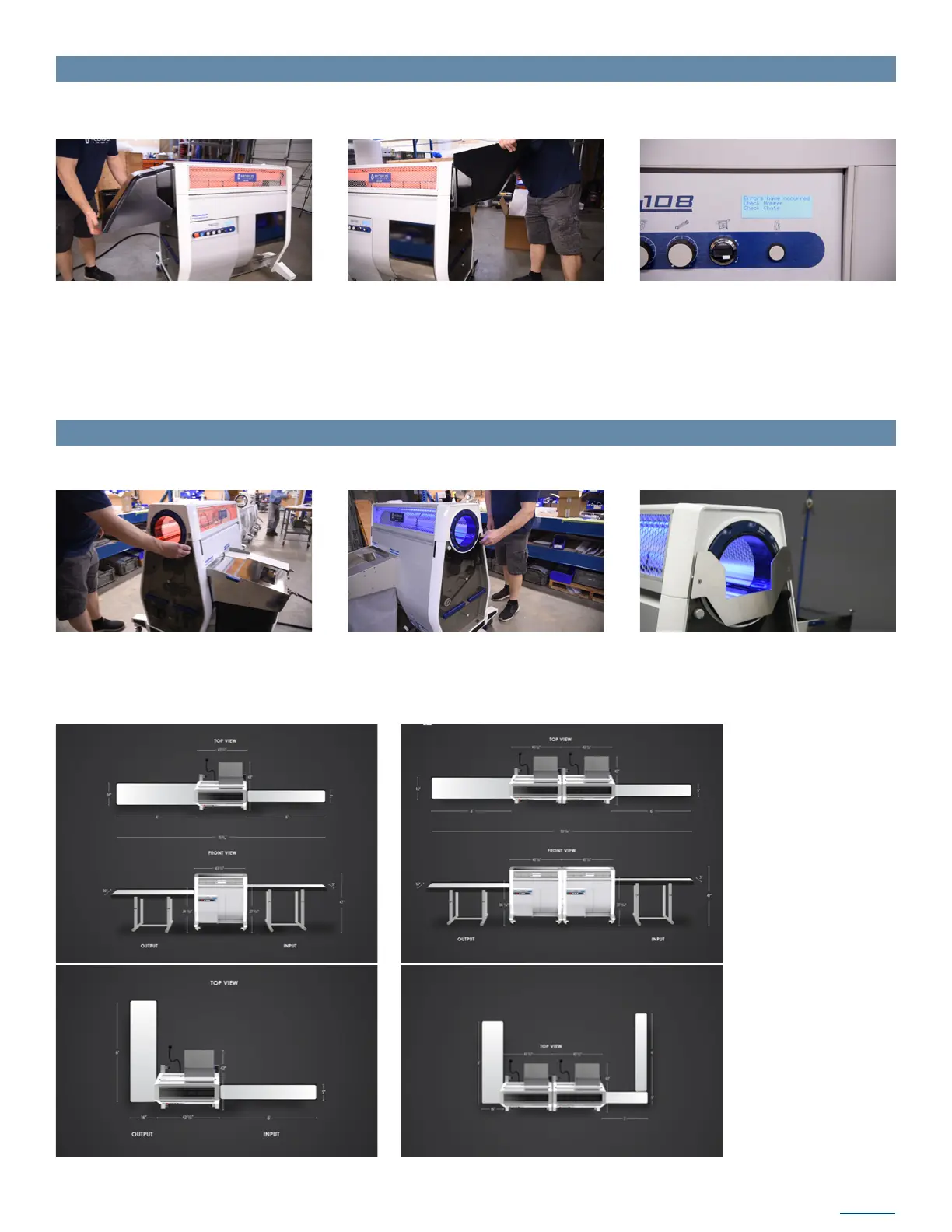
29. The chute attaches to the outfeed side
of the machine with the opening pointed
downward. Locate the lip on the upper
side on the edge that connects to the
machine and hook it into the ledge on
the lid. Rotate the chute down to connect
it to the machine
1. Attach an override puck to the right rear and left front bearing blocks of the machine
to bypass the sensor
30. Attach the hopper to the infeed side
of the machine in the same way as the
chute, with its opening facing up. Hook
the lip into the ledge on the lid and rotate
the hopper base into place
When chute and hopper are installed
properly, these errors will be cleared on
the control panel. The red illumination
of the lid will turn blue when all errors
are cleared, including the release of the
E-stop button, indicating the machine is
ready to run.
2.Attach conveyor infeed guide to the
machine by pushing the pegs into the
Spring Jack connection holes
INSTALLING HOPPER AND CHUTE
CONVEYOR SETUP
Note: The Check Hopper and Check Chute errors will be displayed when they are not installed. The hopper and chute will also be
illuminated on the visual indicator at the left of the control panel.
Note: When managing material infeed and outfeed by conveyor, the hopper and chute detection sensors must be bypassed.
Examples of trimmer
and conveyor setups.


 To Next Page