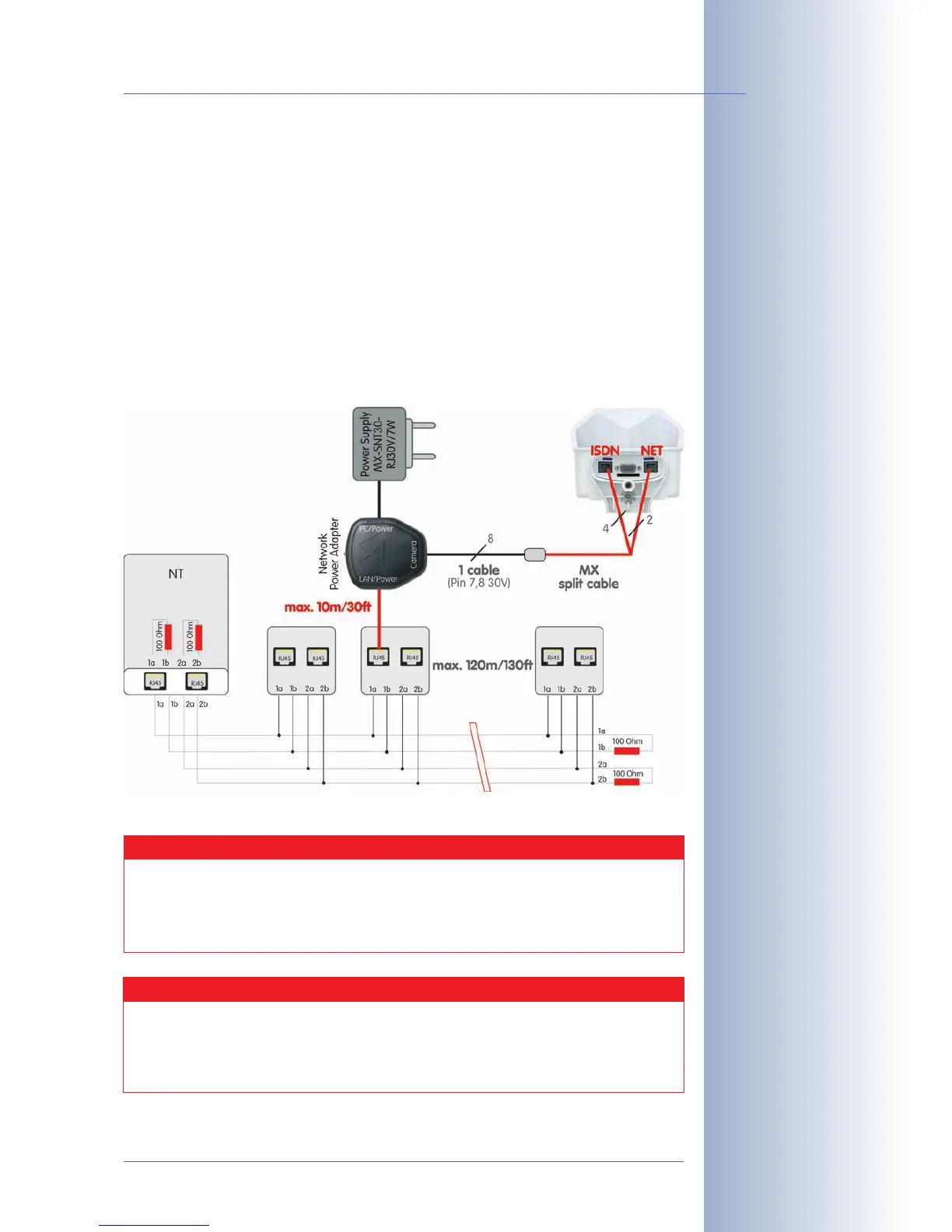
3.3.4 ISDN: Power Supply Using a Network Power Adapter
(1) Push the designated connector of the ISDN split cable (
MX-OPT-ISDN-SPLIT;
optional accessory) into the 10BaseT/NET connector and the remaining cab-
le into the ISDN connector of the camera.
(2) Use an 8-wire (patch) cable to connect the Camera connector of the Network
Power Adapter to the socket of the ISDN split cable.
(3) Connect the LAN/Power connector of the Network Power Adapter to the
ISDN S0 bus/NT.
(4) Plug the RJ45 connector of the external power unit into the PC/Power con-
nector of the Network Power Adapter.
© MOBOTIX AG • Security-Vision-Systems • Made in Germany
www.mobotix.com • sales@mobotix.com
59/92
M12 Camera Manual Part 1
Make sure not to exceed
the maximum cable
lengths
Maximum Cable Lengths (ISDN)
Connection to ISDN outlet: max. 5-10 m (16 to 33 ft.)
Connection to NT (without termination resistors): max. 5-10 m (16 to
33 ft)
Connection to NT (with termination resistors): 120 m (130 yd)
Caution
Missing termination resistors and wrong cable lengths are the
most common installation errors!
Always observe the instructions regarding maximum cable lengths
and proper ISDN termination!



 To Next Page