Prerequisites for using Zeroconf/Bonjour
MOBOTIX camera:
• Activated Zeroconf (Admin Menu> Ethernet Interface). This is the factory
default for MOBOTIX cameras from software version 3.0.3.37.
• The camera needs to be in the same subnet as the computer (Admin
Menu> Ethernet Interface).
Operating system:
• Microsoft Windows (2000, XP, 2003,
Vista): Bonjour for Windows has to be in-
stalled (www.apple.com/bonjour).
The application also configures the Win-
dows firewall, installs an add-on for Inter-
net Explorer and the Java Bonjour librar-
ies. The list of Bonjour-enabled network
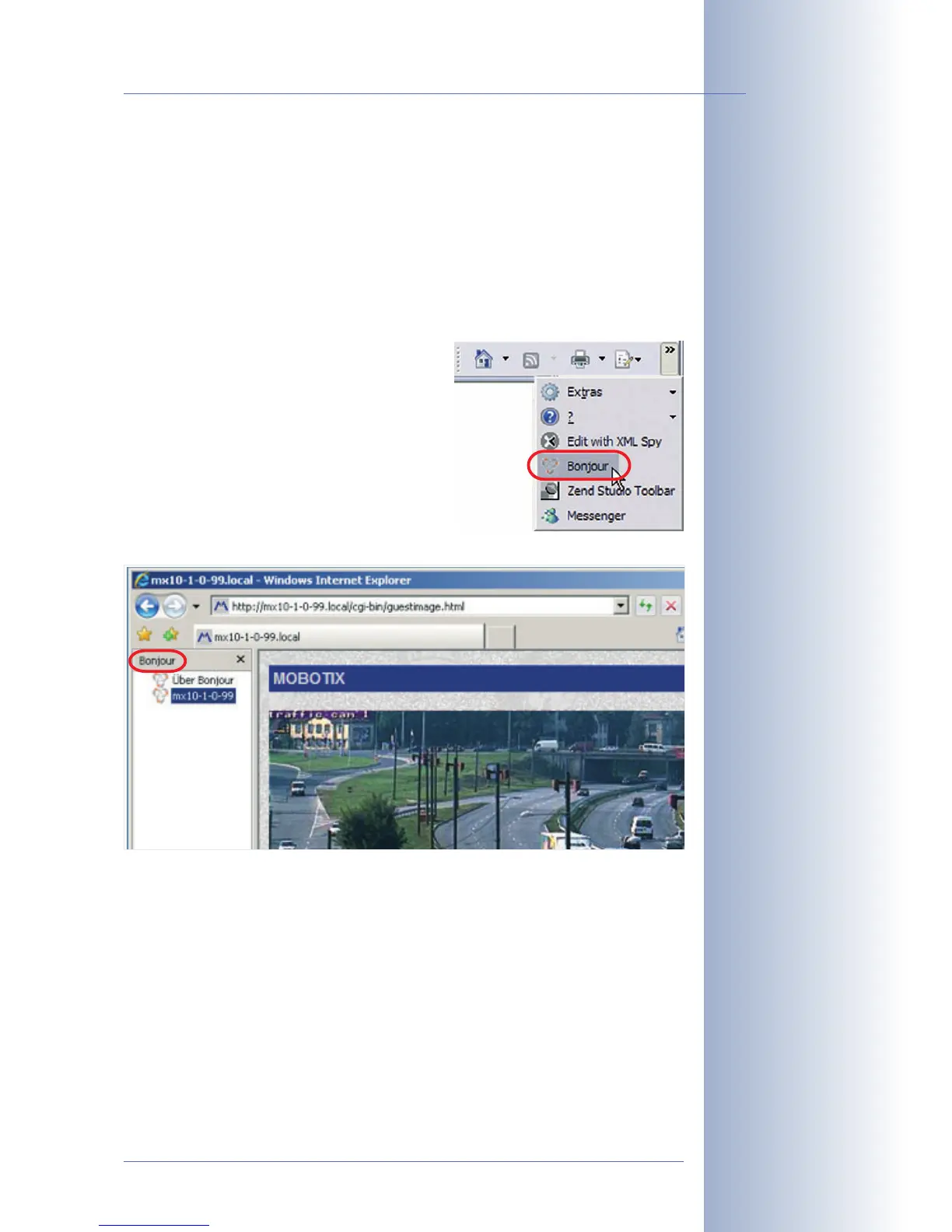
devices is shown in Internet Explorer once
the Bonjour add-on has been activated
in the main toolbar of Internet Explorer.
© MOBOTIX AG • Security-Vision-Systems • Made in Germany
www.mobotix.com • sales@mobotix.com
69/92
M12 Camera Manual Part 1
Internet Explorer (Win-
dows): Activate Bonjour
add-On
Internet Explorer with
activated Bonjour sidebar



 To Next Page