64/148
M15 Camera Manual: Installation
© MOBOTIX AG • Security-Vision-Systems • Made in Germany
www.mobotix.com • sales@mobotix.com
Procedure
1.
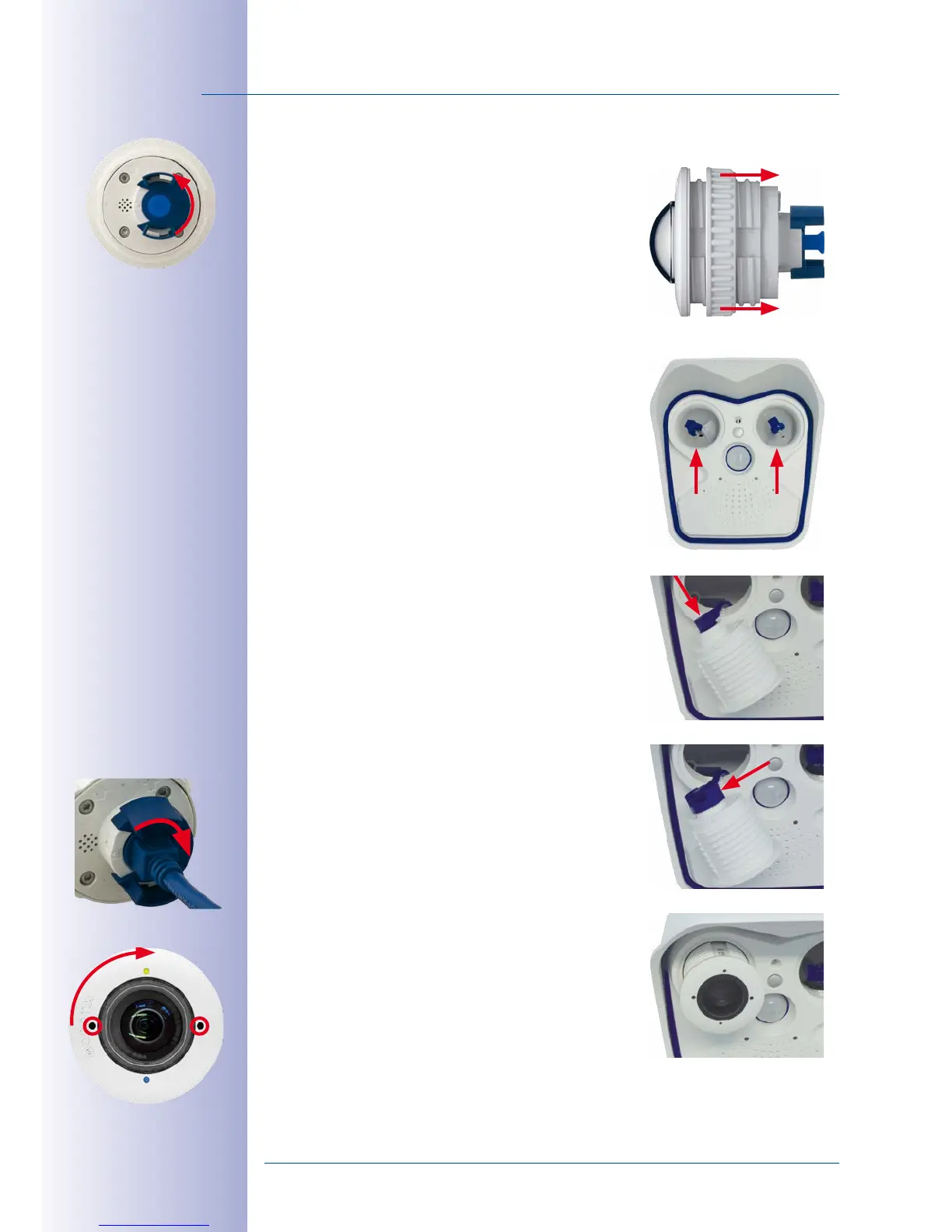
Prepare the sensor module
: Remove the plastic
lock nut (this is not needed any more). Remove the
bayonet catch by rotating it counter-clockwise, then
remove the blue rubber plug.
2.
Remove the transport plugs
: Gently pull the two
transport plugs out of the sensor module sockets by
lifting the rim of the plugs. Now pull the connectors
of the sensor module cables out of the back of the
transport plugs; take care not to damage the con
-
nectors or the cables.
Make sure that you do not
pull the sensor module cables out of the housing!
3.
Connect sensor module cable
: Firmly push the
sensor module cable into the module’s connector
as shown in the figure.
4.
Lock sensor module cable
: Apply bayonet catch
as shown and turn it clockwise until it gently snaps
shut.
5.
Insert the sensor module
: Make sure that the
MOBOTIX lettering on the sensor module is at the
“9 o’clock” position as shown in the figure.



 To Next Page