75/148
Mounting the Camera with Wall Mount
© MOBOTIX AG • Security-Vision-Systems • Made in Germany
www.mobotix.com • sales@mobotix.com
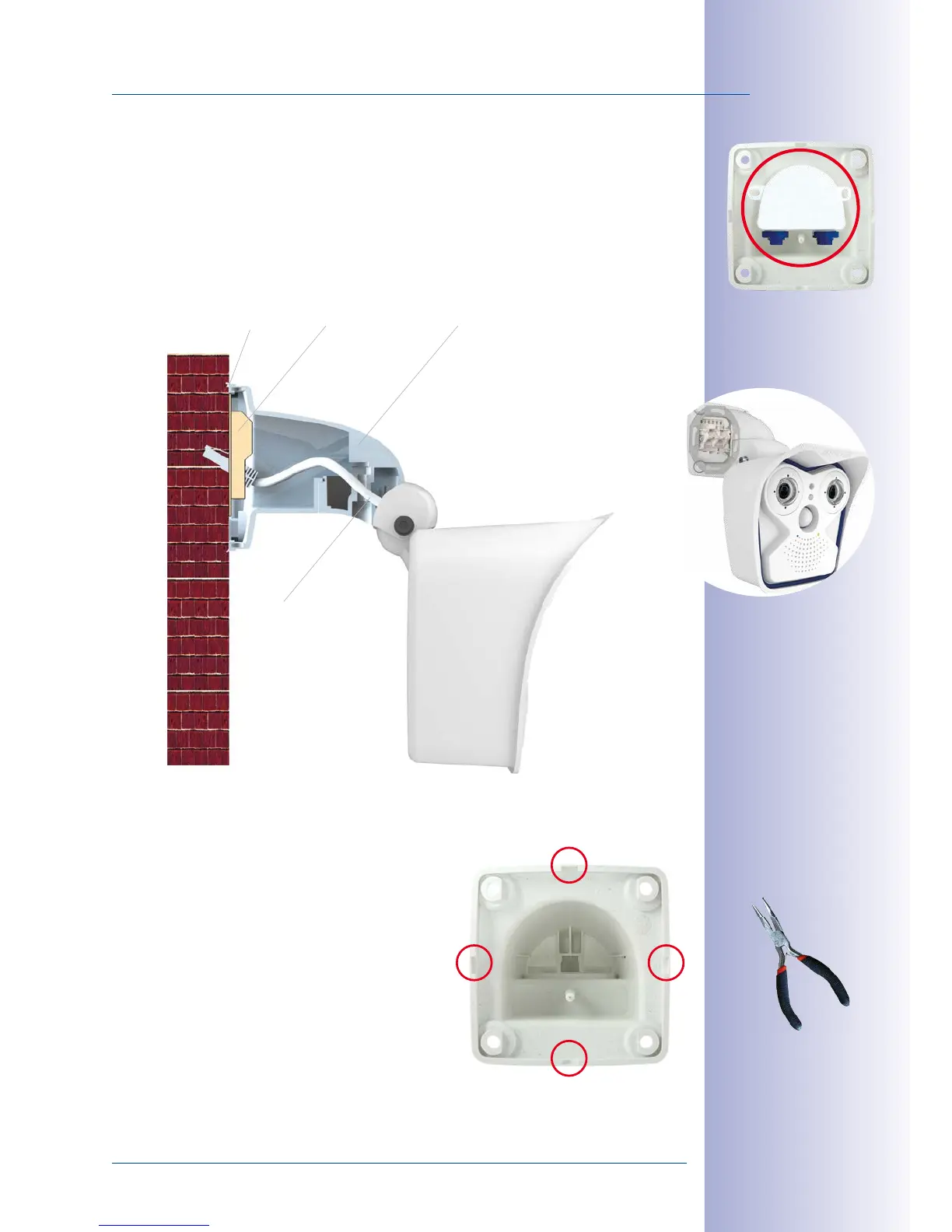
In order to ensure a flush finish with the surface, connect the camera patch cable to
the network cable using a standard adapter that is protected in the wall mount or a
MX-Patch-Box that can easily be inserted into the cavity socket of the wall mount (VarioFlex
mount). For more information on the MX-Patch-Box, please visit www.mobotix.com and
go to the Products> Accessories> Interface Boxes section. It is also possible to install an
in-wall socket with RJ45 connector. When doing so, make sure that the in-wall socket
is placed as high up in the wall mount housing as possible.
When installing on-wall cabling, breaking out one
of the four possible openings in the base of the wall
mount with a pliers will ensure that the cables can
be fed neatly into the camera. The connection to
the camera patch cable can be established using
a suitable adapter within the wall mount.
Caution: If using the camera outdoors, only use
the opening at the bottom of the mount to prevent
water from entering the mount!
MX-Overvoltage-Protection-Box
the wall mount
Wall seal In-wall socket Wall mount
Camera patch cable
Pliers to break through
a cable guide



 To Next Page