| 15 |
Note!
.
MOCAarm is subject to and complies with electromagnetic compatibility (EMC)
standard of EN 60601-1-2, EN 301 489-1, EN 301 489-17, EN 300 328 and U.S. federal
guidelines, Part 15 of the FCC (Federal Communications Commission) rules for
devices with RF capability. These guidelines help ensure that your device will not
affect the operation of other nearby devices. Additionally, other devices should not
affect the use of your device.
.
As a safeguard, we recommend that if you have
arrhythmias such as atrial or ventricular premature beats and atrial fibrillation or
any other special conditions you should check with your physician before using your
device.
.
Other wireless devices that are in use nearby, such as a cell or mobile phone, or a
wireless network, may prevent or delay the transmission of data from your device to
paired Bluetooth device. Moving away from the source of the interference or turning
off these devices to resolve the problem.
.
Make sure MOCAarm and paired Bluetooth device are within acceptable distance (no
more than 10 meters) with each other. If not, put them closer.
.
If you plan to transmit test results to paired Bluetooth device, be sure to select User
1, 2, or 3 before measurements, in case other people’s results may be transmitted to
your paired Bluetooth device or included in your past results.
.
Be sure to select the correct User on the monitor before your blood pressure
measurement begins.
.
Bluetooth date transmission is not available under measurement.
Under standby mode, user can press the “ ” button for 3 seconds to
activate Bluetooth function, and Bluetooth symbol will flash on the
screen.
2. If MOCAarm is connected successfully to your smart device, Bluetooth
symbol will appear on the screen.
3. If the monitor cannot be connected to paired Bluetooth-enabled
device over 45 seconds, LCD will display Error message “E4” and
Bluetooth will be turned off.
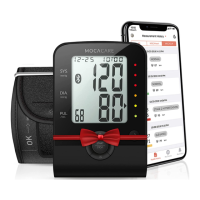
App for Bluetooth
Download and install “MOCACARE” app on your smart device from Google
Play or App store. System requirement of the Bluetooth-enabled device.
Bluetooth 4.2 for Android 4.3 or above
Bluetooth 4.2 for iOS 7.0 or above


 To Next Page