| 30 |
TROUBLESHOOTING
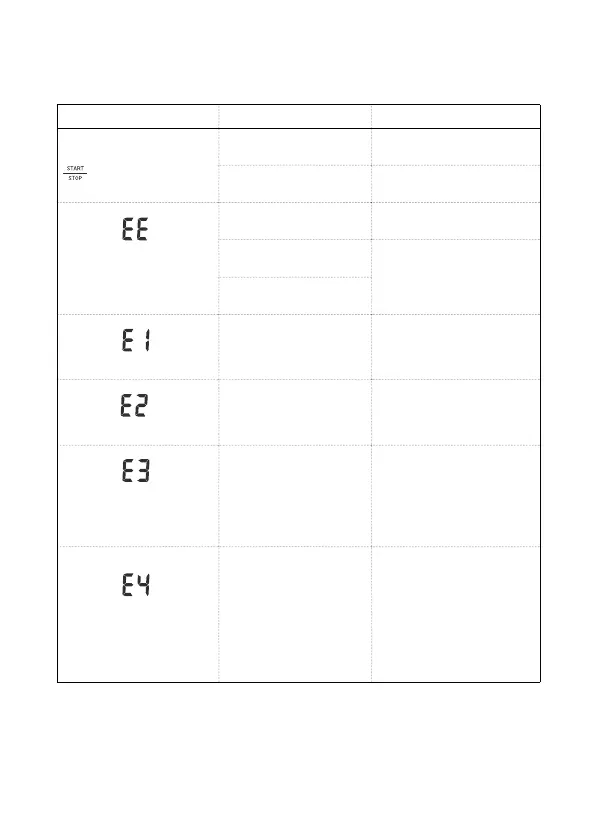
SYMBOLS/SYMPTOMS CONDITIONS/CAUSES INDICATION/CORRECTION
Unit does not turn on when
button is pushed.
Worn-out batteries.
Replace them with 4 new AAA
(1.5V, LR03) alkaline batteries.
Battery polarities have been
positioned incorrectly.
Re-insert the batteries in the
correct positions.
Measuring Error Symbol
appears when blood pressure
value displayed is excessively
low or high.
Cuff has been placed
incorrectly.
Wrap the cuff properly so that
it is positioned correctly.
Did you talk or move during
measurement?
Measure again. Keep arm
steady during measurement.
Shaking of the arm with the
cuff on.
Measuring Error Symbol
Air circuit abnormality. Cuff
tube may not be plugged
into monitor correctly.
Check cuff connection. Measure
again.
Measuring Error Symbol
Inflation pressure exceeding
300 mmHg.
Switch the unit off, then
measure again.
Measuring Error Symbol
Can’t determine blood
pressure measurement
data.
Wrap the cuff properly and
keep steady. Measure again.
Measuring Error Symbol
If the device cannot be
connected to paired
Bluetooth-enabled device
over 45 seconds, LCD will
display Error message “E4”
and Bluetooth will be turned
off.
Please press M button for 3
seconds to start Bluetooth
function.


 To Next Page