10
OPENING THE MOCKMILL
If the Mockmill is not operating properly, or if heavy soiling is
suspected it makes sense to open the Mockmill. Then you can remove
grain residue from the milling chamber and clean the two stones
using a soft brush or a wooden spatula. Be careful not to lose the
two small springs that support the upper stones! Please follow the
instructions below.
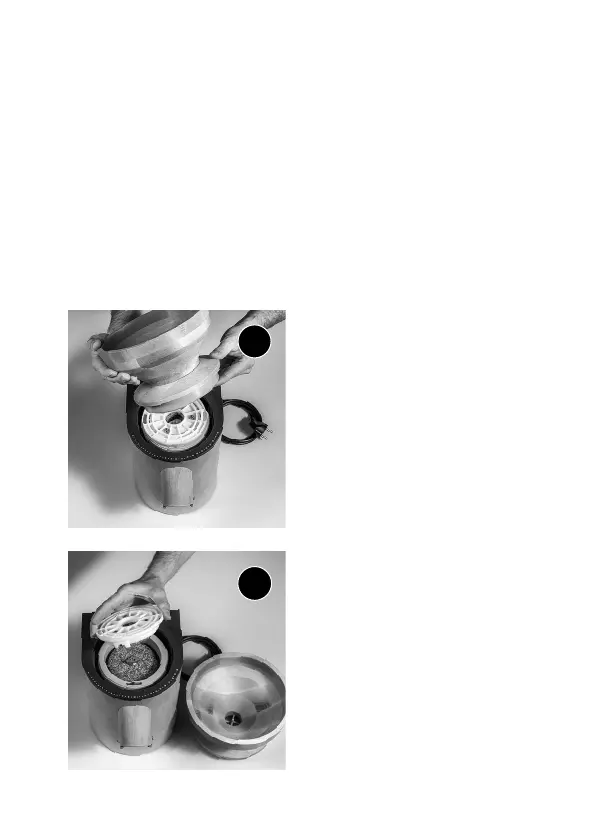
Please disconnect the Mockmill from
the power socket before opening. Turn
the hopper anti clockwise.
1
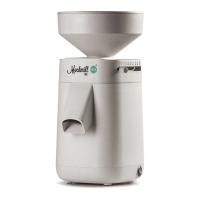
You can now lift the upper stone
(stator) and control the milling
surfaces.
If a hard film has built up on the
stones please see page 17 where we
show how such a film can be removed.
Now the stator can be put back into
place. Then you can remove grain
residue from the milling chamber and
clean the two stones using a soft
brush or a wooden spatula. Be careful
not to lose the two small springs that
support the upper stones!
2


 To Next Page