Adjusting Volumes
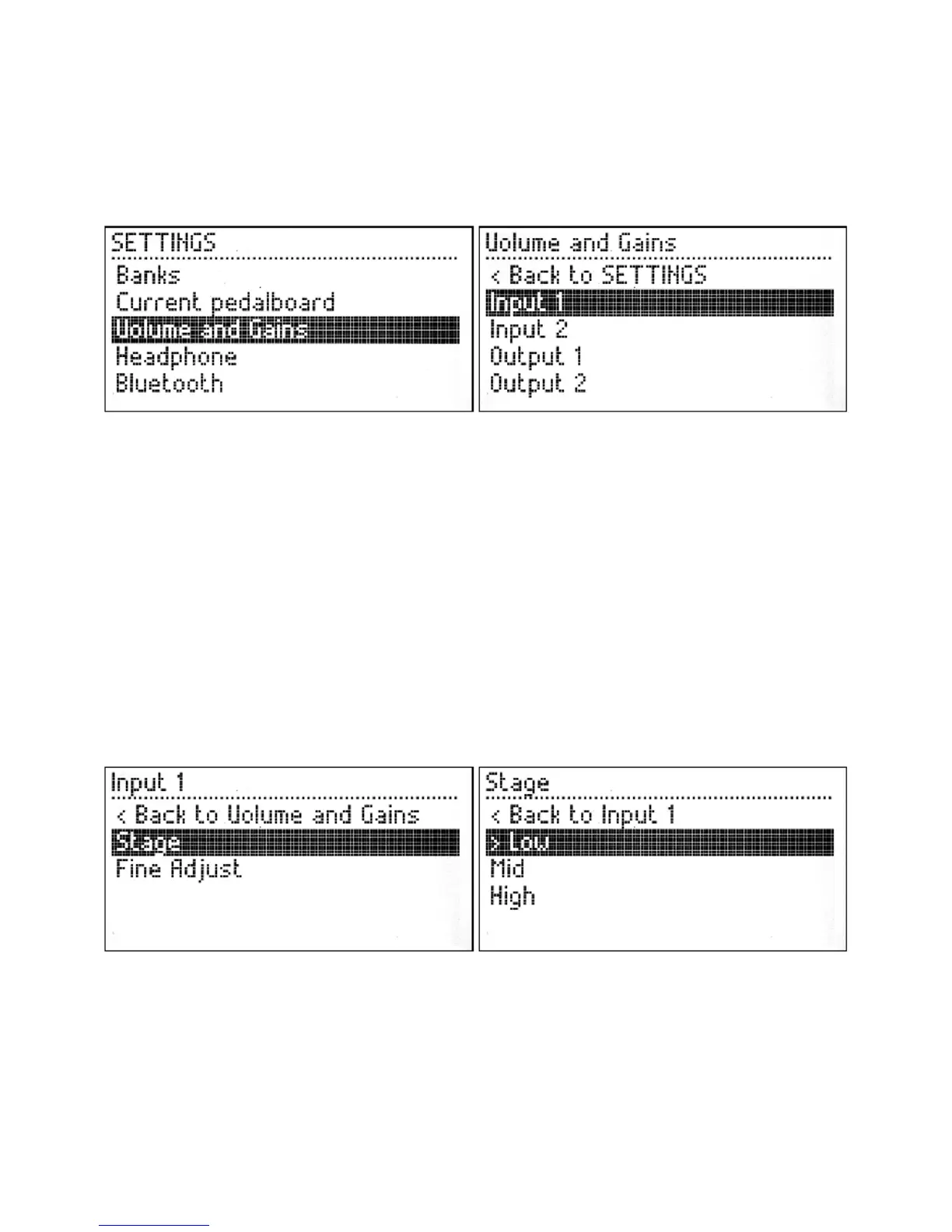
The MOD Duo allows each input and output volume to be individually adjusted. To access the
Volume and Gains menu, first press and hold the left knob for one second. The SETTINGS menu
will show up, now turn the left knob to select the Volume and Gains option and finally short press
the knob to access it.
In the Volume and Gains menu, turn the knob to select the input or output you want to adjust and
short press the knob to access it.
Inputs
The options for adjusting the inputs are Stage and Fine Adjust.
The Stage menu allows you to adjust the gain stage of the selected input. Inside of the Stage menu
there are 3 options: Low, Mid and High, representing the following input gain levels:
Low = -22dB
■
Mid = -9.5dB
■
High = +3dB
■
You should select the gain stage that best applies to the instrument you have connected. Short press
the knob to activate the selected gain stage.
Once you have chosen the desired Stage value you can return to the previous menu by selecting the
Back to ... option.
The Fine Adjust menu allows you to adjust the gain of the selected input. You should turn the knob
until you get the desired value.


 To Next Page