Page 10 of 20 BM06101 Molift MOVER 300 English Rev E 24/09/2013
Battery and charger system
Battery care and charging
Molift Mover 300 is supplied with a battery with a
26,4 V cell unit that is placed in the battery hold-
er on the lift. A battery charger is also supplied to
be located easily accessible, either stand-alone or
mounted on the wall. Connect the charger mains
cable to the wall socket when charging the bat-
tery. The Charger must be placed or installed in
a way that makes it easy to disconnect mains ca-
ble plug. Disconnect the charger mains cable plug
when the charger is not in use. Take care not to
damage the cable
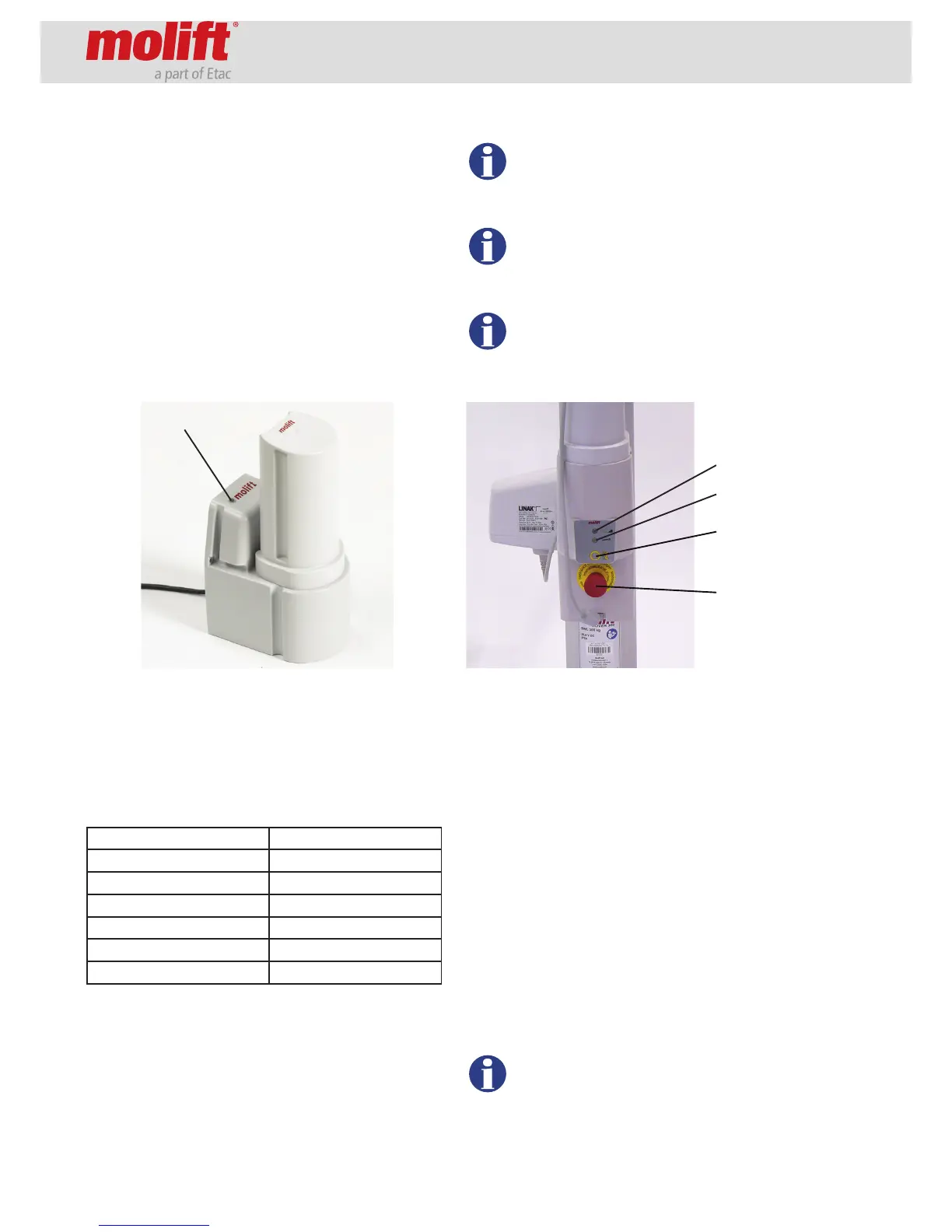
Place the battery in the charger. After a few sec-
onds the LED will change from yellow to orange,
indicating that the battery is charging. When the
LED gives a constant green light the battery is fully
charged. The charger LED (Light Emitting Diode)
is indicating the status of the battery as described
below:
Charger LED Mode
Yellow No battery
Yellow Initiation (10 sec)
Red Fast charge
Green/Yellow Top-off charge
Green Trickle charge
Red/Green Error
Battery capacity
The battery lamp on the hand control and on the
battery holder will illuminate if the voltage of the
battery falls below a certain level, indicating the
need for charging. There will also be an audible
signal. There is still enough capacity to perform
3-5 lift cycles (75 kg/ 165 lbs) at this point.
If the battery is discharged during a lift, it
is always enough power to lower the user
down again.
New batteries will not achieve full capaci-
ty before it has been fully charged and dis-
charged a couple of times.
The battery lifetime is about 500 charging
cycles.
Electronics
There is a counter implemented in the electronic
system of the lifter, registering the number of lifts.
This number can be read by using the Molift Serv-
ice tool, and a service lamp indicates when the lift-
er needs service consisting of exchange of the lift-
ing motor. See the chapter “Maintenance”.
The electronic system has a power save-function
which makes the system sleep after a while with
no activity. All lights will go out. Activate the sys-
tem by pushing one of the buttons on the hand
control.
If the lifter is run up and down constantly for a
longer period, the electronics may be overheated
and the lifter will stop. Wait until the lifter is cooled
down enough for further use.
Discarded lifters and batteries should be
handled as electronic waste and collected
separately according to local laws and reg-
ulations.
Emergency
stop
Electrical
emergency
lowering
Service lamp
Battery lamp
Charger LED


 To Next Page