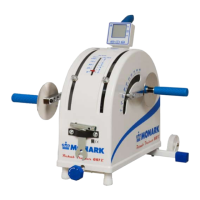
Calibration
The 939 E is a mechanically weighted and braked
ergometer, making performance validation a simple
procedure. The work performed on the ergometer is
the product of the weight lifted times the numbers
of revolutions (factored). Validation includes both
mechanical and electronic procedures. If the ergometer
fails to pass any section of the validation, proceed to
the calibration and/or service menu (99 in the main
menu).
Inspection of all mechanical components is suggested
after any repair, or component service. The following
validation should be performed annually:
Remove the cover from the flywheel.1.
Loosen the brake belt at the balancing spring.2.
Wait until the flywheel is no longer moving.3.
The pendulum weight index should be aligned 4.
with “0“ on the scale.
Attach the calibration weight to the point at which 5.
the spring was attached.
The known weight should match the value on the 6.
scale. If not see section “Calibration of Pendulum
Weight “.
Reattach the tension belt.7.
Reassemble the cover.8.
Proceed to the validation to complete.
Validation
The following procedure will assure the user that the
ergometer is performing properly on a daily basis.
The test exercises the mechanical braking, pedalling
and speed detecting systems as well as the computer
regulation and sensing capability of the mechanical
system. Additionally, if a calibrated ECG simulator
is available, it may be used to verify the heart rate
measuring system. Whether the simulator is used
or not, the heart rate system may be validated by
simply taking a pulse point rate measurement at
the neck for example. While a patient is at rest and
has been prepared for chest belt electrodes or an ear
sensor, the pulse indicator flashes once per pulse beat.
The flashing heart rate must be consistent with the
manually recorded pulse. If it does not correspond,
check the chest belt contact area and moisten if
necessary the electrode surfaces with water. If this
fails, call customer service.
Validation of force
To do this you need to have the bike connected to a
computer with Monark software (manual mode) or
that the handheld controller is used.
From main menu go to any start display with Newtons
(N).
With the pendulum pointer at 0, the display should 1.
read "0 N".
Move the pendulum weight to the 4 kp position 2.
and the display should read “39“ Newtons.
NOTE!
After this verification, the brake belt will be loose,
which means that it takes about 15 seconds before the
regulating device has tense the brake belt to normal
again (5 N).


 To Next Page