Moneris® Go Plus: Setting up Your Terminal 6
Setting up and using the communication base
This optional communication base is only available upon purchase. Use the optional communication base when
there is a weak cellular signal on your terminal. The communication base enables the terminal to communicate
with Moneris using your Ethernet or Wi-Fi network.
Note: The communication base can only be connected using Ethernet connectivity.
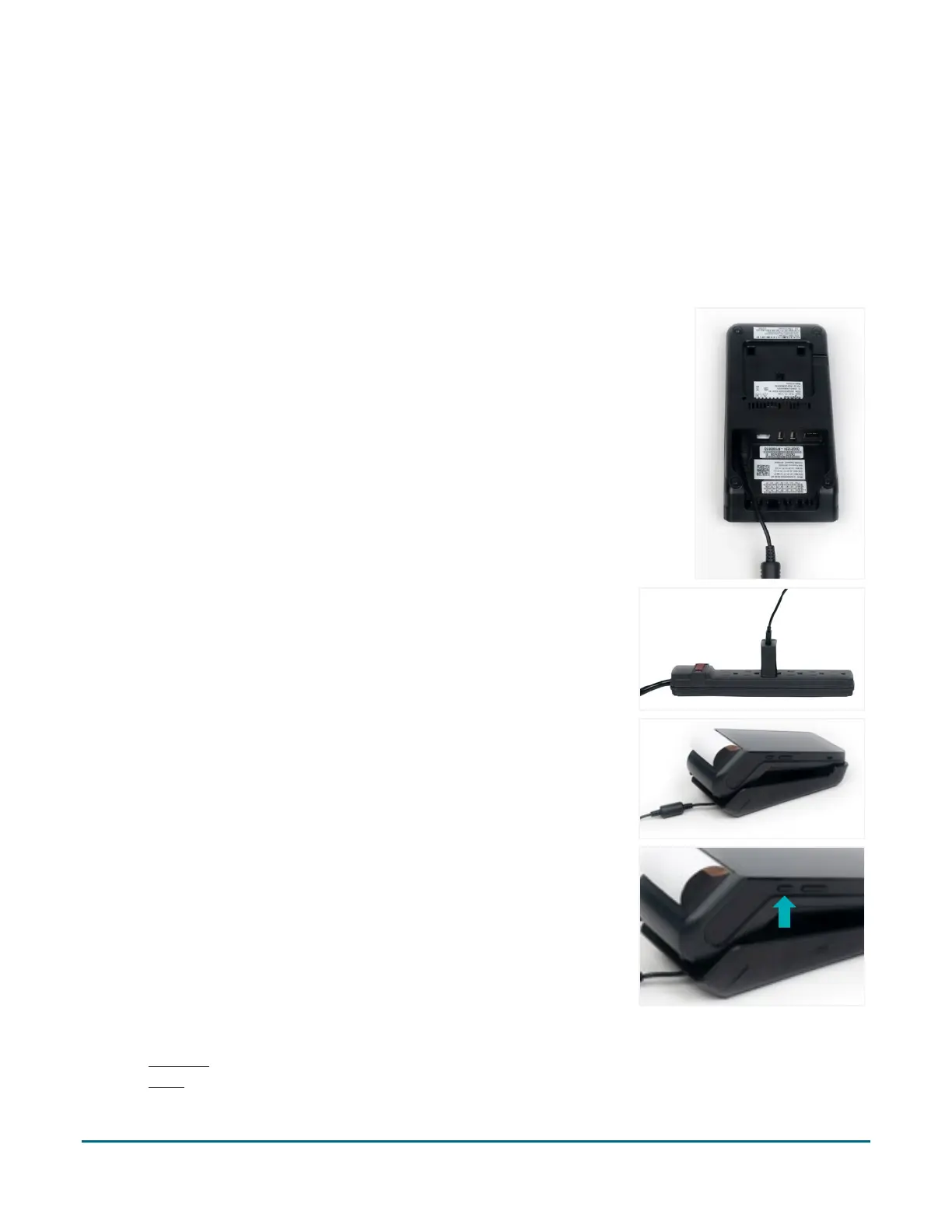
How to connect the power
1. Unfold the charging cable.
2. Connect the charging cable to the power adaptor.
3. Then turn the communication base upside down and connect the
power adaptor cable to the power port in the back of the
communication base.
4. Make sure the AC adaptor is connected to the other end of the
charging cable. Plug the AC adaptor into a working electrical outlet.
Note: Use a power bar to avoid electrical surges.
5. Turn the communication base right side up and dock the terminal
on the base. Ensure the terminal fits securely over the two prongs
on the base.
6. Locate the power button on the left side of the terminal. Press and
hold the power button for 3 seconds to turn on the terminal. The
terminal will continue to charge while on the base.
7. Choose one of the following methods to connect the terminal/base to your local network:
Ethernet
Wi-Fi



 To Next Page