22 MR6550
User Manual
ENGLISH
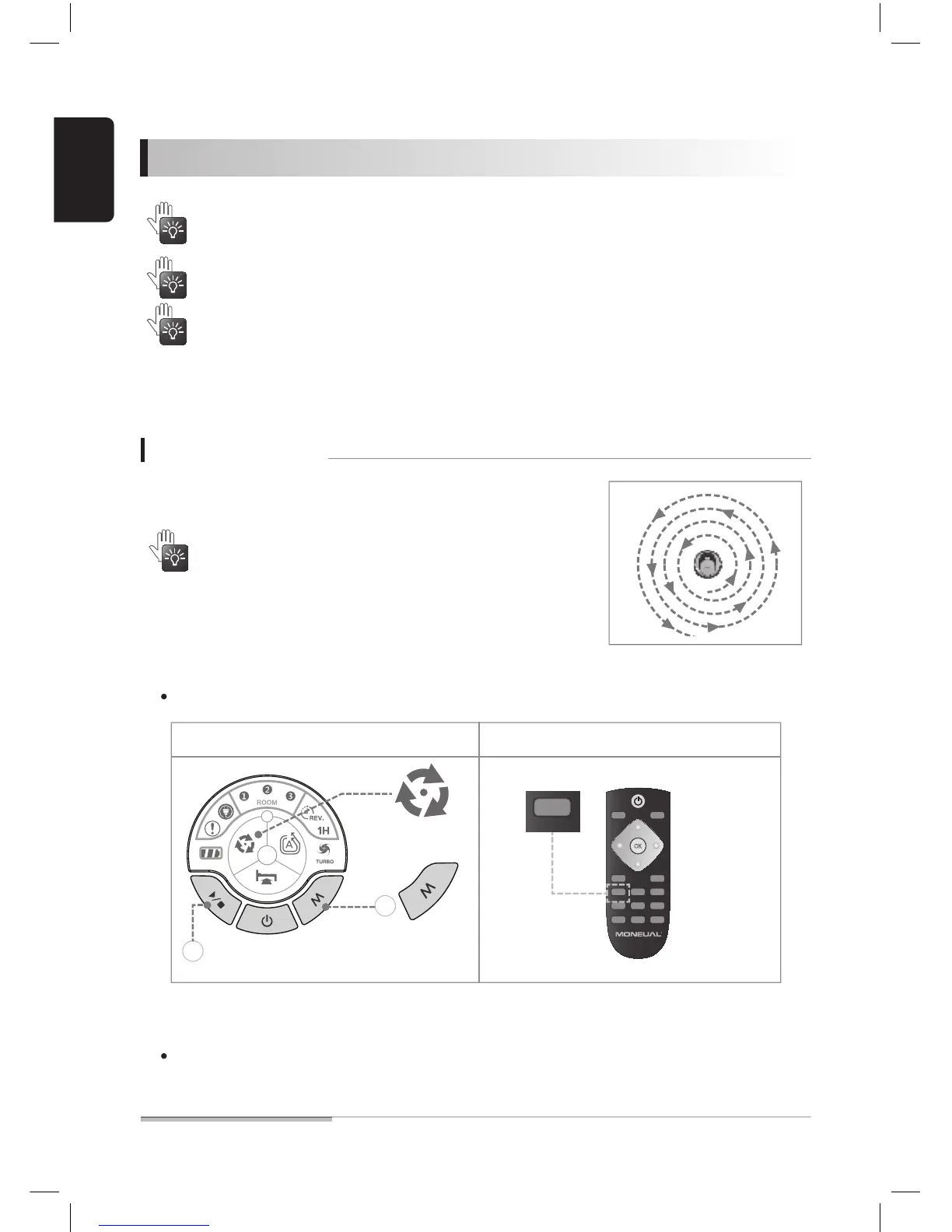
01. Select the focused cleaning mode.
02. Press the [START/STOP] button.
The main body shows the [Focused cleaning] indication.
After cleaning is completed, the robot cleaner stops at its current place.
On the remote controller, press the focused cleaning button to start cleaning immediately.
Using advanced cleaning functions
It is possible to select and clean spaces that are not easy to clean through the default automatic
cleaning.
For corners and some spots where the robot cleaner cannot reach, the product will not be able to
clean completely.
Before using the advanced cleaning functions:
◆ If the site has many obstacles around it, the cleaning may
not be successful due to interference from them.
◆ When the focused cleaning mode is expanded and an
obstacle is detected, it is not switched to the downsized mode.
From the current position, the robot cleaner performs
focused cleaning over a 1 m-radius area.
◆ You cannot select a different cleaning mode while the robot cleaner is cleaning or being
charged.
◆ In this case, you need to press the [START/STOP] button to stop current operation and then
select a cleaning mode.
Focused cleaning
Main body button
Remote controller button


 To Next Page