10
Tuner
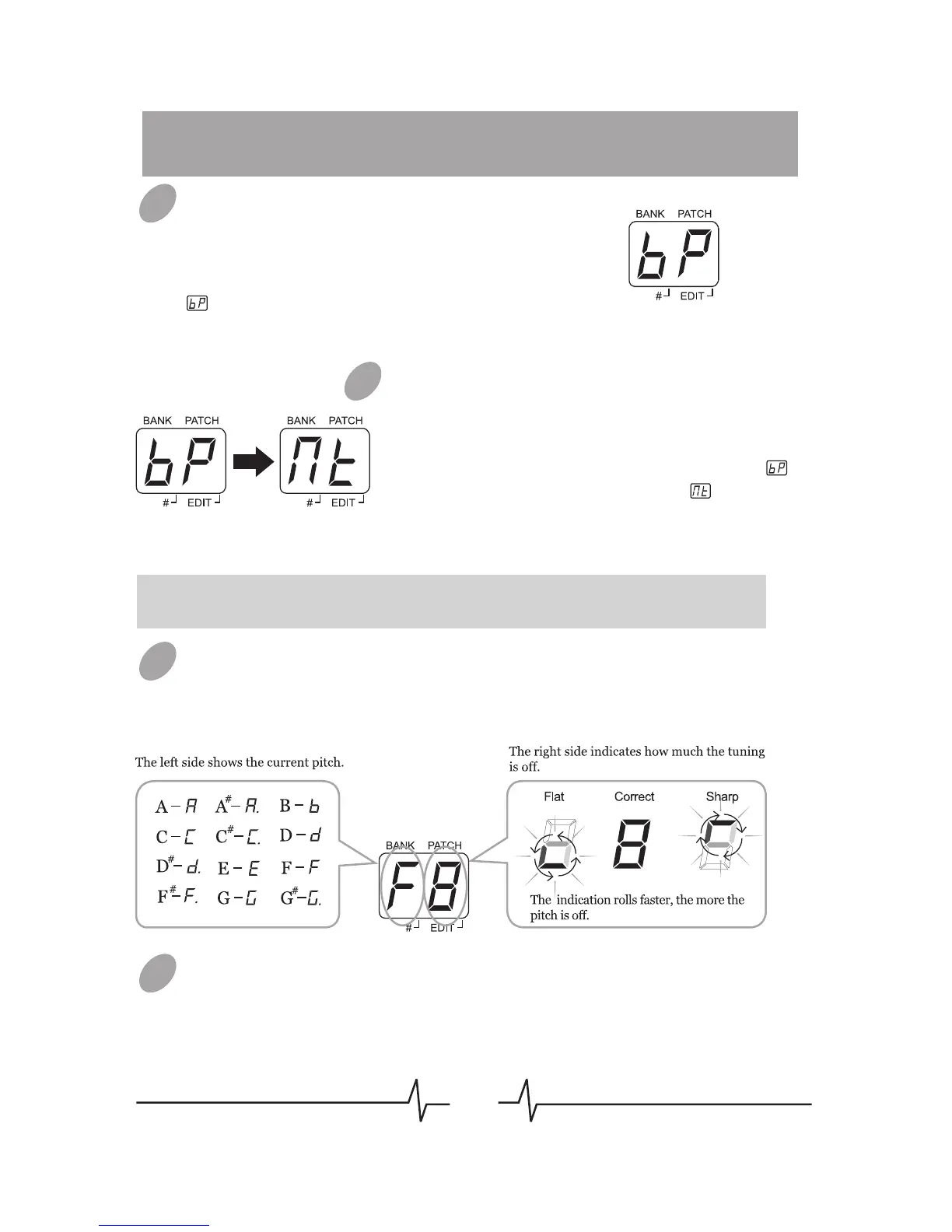
Entering Bypass Tuning Mode
When in PLAY mode, press both [PATCH –]
and [PATCH +] footswitches together to
enter bypass tuning mode. LED will display
for 1 second, then begin to show tuning
indication.
Entering Mute Tuning Mode
When in PLAY mode, hold both [PATCH –]
and [PATCH +] footswitches together longer
than 2 seconds to enter mute tuning mode. In
course of this operation, LED will display
for 1 second then turn to display , when
releasing the footswitch, LED begin to show
tuning indication.
Note: In mute tuning mode, no sound will phonate through the output of
BEM Box.
Tuning
Play one bass string at a time, and adjust the bass pitch as
LED’s instruction.
Quit Tuner
When in tuning mode, press both [PATCH –] and [PATCH +]
footswitches together or anyone of these 2 footswitches to quit
tuning state. BEM Box will return to PLAY mode.
01
03
03
02


 To Next Page