14
Change Setting
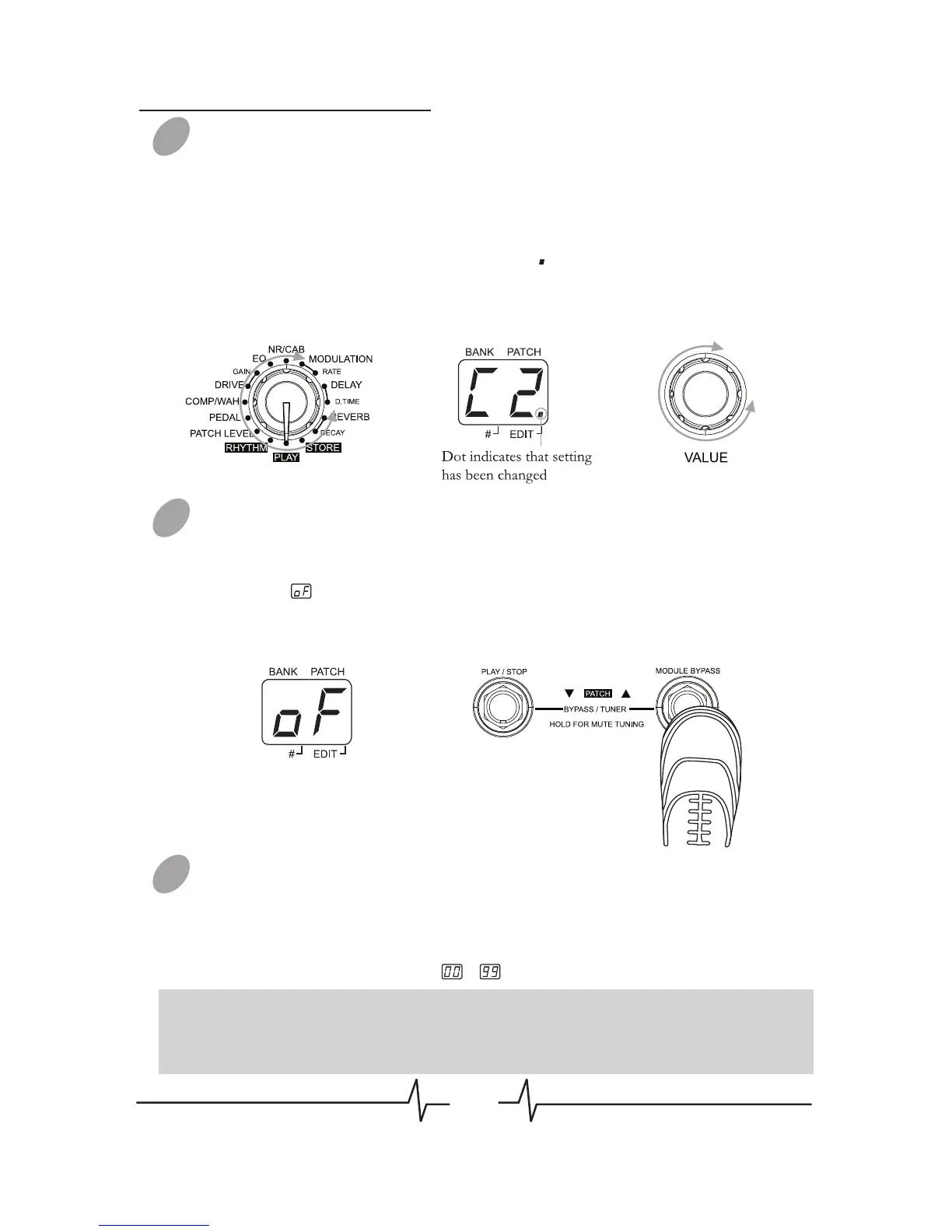
Press [VALUE] knob to change effect/parameter type ahead, hold
and rotate [VALUE] knob to change effect/parameter type ahead
(clockwise) or backwards (anticlockwise), rotate [VALUE] knob to
set a new value of the effect type or parameter. As long as the
selected item’s value changes, a dot (.) will appear in the bottom
right of the display. This indicates that a setting has been changed
from the currently stored value.
Bypass an Effect Module
When adjusting an effect in EDIT mode, press [MODULE
BYPASS] / [PATCH +] footswitch to bypass this effect module, the
indication will appears on the display and the module will be
turned off. Pressing [MODULE BYPASS] / [PATCH +] switches
once more will return the setting to the previous condition.
Adjusting the Patch Level
Set the Module Selector to [PATCH LEVEL], rotate [VALUE] knob
to adjust the volume of a patch, LED display will show the current
level.
The range of patch level is ~ .
02
03
04
Patch Editing
Note: If you return to [PLAY] module and select another patch, the
changes you have made in edit mode will be lost unless you store the
patch first.


 To Next Page