06
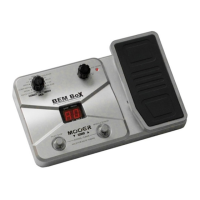
Module Selector: Switches between every function module. In
patch edit mode, this knob selects the module/parameter for operation.
VALUE Knob with Enter Button: Dial the knob for setting master
level, or changing parameter values. Press the button to switch effect
type, ensure storing, etc.
LED Display: Shows bank and patch numbers, setting values, and
other information for operating.
PATCH – [PLAY/STOP] Footswitch: Selects patches
(backwards), controls the tuner, start/stop drum rhythm, and other
functions.
PATCH + [MODULE BYPASS] Footswitch: Selects patches
(forwards), controls the tuner, bypass effect module, and other
functions.
Expression Pedal: Adjusts volume or some effect parameters.
EXP. PEDAL LED: Indicates the status of the expression pedal.
INPUT Jack: 1/4” mono audio jack, for connecting bass. When
operating BEM Box on batteries, plugging bass cable into this jack will
turn on the unit.
OUTPUT [PHONES] Jack: 1/4” stereo audio jack, for connecting
headphone or bass amplifier. Using a mono cable can output the signal
to an amplifier, or use a Y cable to output the signal to two amplifiers.
Also can plug a stereo headphone into this jack.
DC 9V Jack: For power supply, use a 9-volt DC regulated by AC
adapter, 300mA (plug polarity is positive on the barrel and negative in
the center).
Battery Holder: For installing batteries (AA x 4).
10
09
08
07
06
05
04
03
02
01
11
Panel Instruction


 To Next Page