Main Features
Overview
Precautions
Talk Wah Pedal
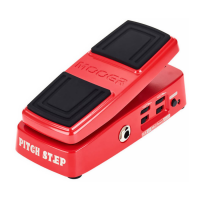
Red Kid is a vocal simulation pedal which lies somewhere
between a wah wah and a talk box. It clearly replicates 2
different vocal sounds like you may expect to hear from a
talkbox or vocoder device. Operated like a traditional wah
pedal it's super expressive and there's no need for messing
about with microphones or rubber hoses. Just pop it into
your effects chain like any other pedal. Red Kid comes
equipped with MOOER's unique pressure sensing
footswitch for instant operation. Making your guitar talk
has never been so simple!!!!
Talk wah replicates the tonal qualities of the human
voice and can bring new inspiration to your music
Equipped with MOOER's unique pressure sensing
footswitch
Simulates 2 different vocal sounds
True Bypass switching
Rugged metal housing
Power Supply
Connections
Always turn off the power of this and all other equipment
before connecting or disconnecting, this will help prevent
malfunction and / or damage to other devices. Also make
sure to disconnect all connection cables and the power cord
before moving this unit.
Cleaning
Clean only with a soft, dry cloth. If necessary, slightly moisten
the cloth. Do not use abrasive cleanser, cleaning alcohol,
paint thinners, wax, solvents, cleaning fluids, or chemical-
impregnated wiping cloths.
Interference with other electrical devices
Radios and televisions placed nearby may experience reception
interference. Operate this unit at a suitable distance from
radios and televisions.
Location
To avoid deformation, discoloration, or other serious damage,
do not expose this unit to the following conditions:
Direct sunlight
Magnetic fields
Heat sources
Strong vibrations or shocks
Excessive dusty or dirty location
Extreme temperature or humidity
High humidity or moisture
This device complies with Part 15 of the FCC Rules. Operation
is subject to the following two conditions:
This device may not cause harmful interference.
This device must accept any interference received, including
interference that may cause undesired operation.
FCC certification
Please Read Carefully Before Proceeding
Please connect the designated AC adapter to an AC outlet
of the correct voltage. Please be sure to use only an AC
adapter which supplies 9V DC(±10%), , center
negative. Unplug the AC power adapter when not in use or
during electrical storms.

 Need help?
 General










 To Next Page