MOON Eclipse CD Player
Top Panel Controls
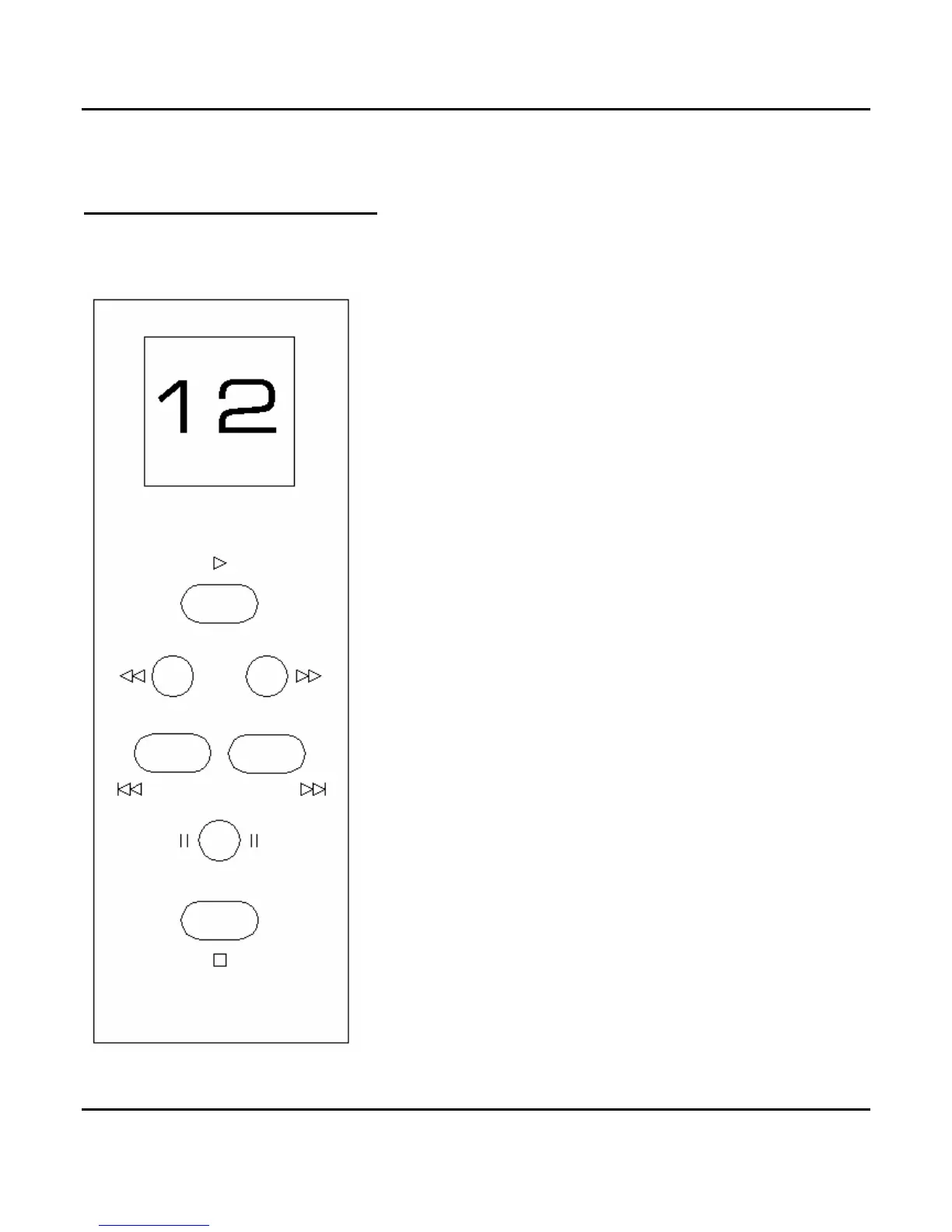
Located at the top of this control panel is a small display
window which indicates the track currently being played.
When a compact disc is first loaded into the Eclipse and
its table of contents is read, the total number of tracks
will appear in the display.
Press
X to begin playing a disc. Pressing X while the
track is already playing will result in the current track to
start playing again from the beginning.
Press or to scan backwards or forwards through the
track that is currently playing. The scanning speed will
increase the longer the button is pressed. As well, the
output level is reduced to protect against damage to your
loudspeakers.
Press to search backward or to search forward
through the compact disc’s table of contents for a specific
track. When you’ve located the track number, press
X to
begin playing that track. In the event that you initiate a
forward or backward track search while a disc is already
playing, the output signal will be muted during the search
and the track you select (when you stop searching) will
automatically start playing; you need not press
X.
Press
to pause the compact disc currently playing. The
disc will continue spinning and the laser will be suspended
in its current position. Press pause a second time to
resume playing of the disc. Pressing
X while the disc is
paused will result in the laser going back to the beginning
of the current track; since the disc is still paused, you will
have to press
to resume playing the disc.
Press
to stop the compact disc from playing. The laser
will return to the start position of the disc.
Figure 2: Top panel of Eclipse CD Player
Top Panel Controls 10


 To Next Page