MOON Eclipse CD Player
Connecting the Eclipse Power Supply
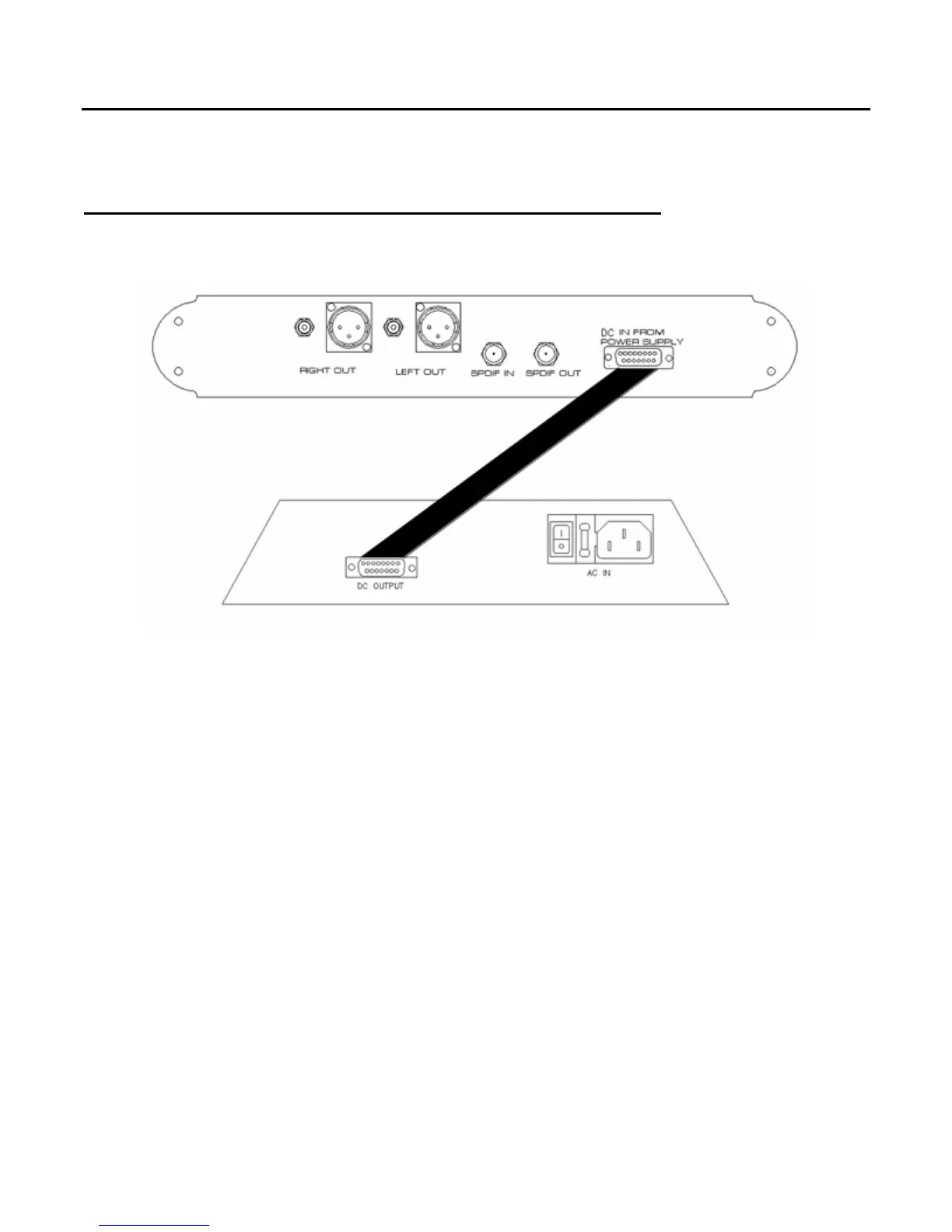
Figure 1: Connecting the Moon Eclipse (top) to its Power Supply (bottom)
1. There is one connection that must be made between the MOON Eclipse CD Player and its
separate power supply as shown above in Figure 1; Using the supplied DB15 cable, connect the
end, with the male pin socket, to the plug labeled “DC Output” located on the rear panel of the
power supply. Connect the other end of the cable, with the female socket, to the plug labeled “DC
in From Power Supply” located on the rear panel of the CD player. To secure the connections, use
your fingers to carefully turn each of the two (2) poles on both ends of this cable in a clockwise
motion until you can no longer turn them, making sure not to over tighten. Do not attempt to
modify the length this cable – its specifically designed for optimal performance.
2. Connect the supplied AC power cable to the IEC receptacle, located on the rear panel of the CD
player’s power supply chassis. Alternatively, if you wish, you may use a dedicated high-performance
AC cable designed for CD players. Ensure that the AC wall outlet you use has a functioning ground.
For the best sonic performance, it is preferable that you plug your MOON Eclipse CD Player
directly into a dedicated AC outlet and avoid using an extension cord.
3. In order to obtain the maximum performance from your audio system, we strongly recommend that
the detachable power cord not come into physical contact with any of the interconnect cables in
your system. In the event that this can’t be avoided, you should ensure that any cables coming into
contact with each other are crossed at ninety degree angles to minimize the contact area.
____________________________________________________________________________________
Connecting The Eclipse Power Supply 8


 To Next Page