MOON Eclipse CD Player
Front Panel Controls
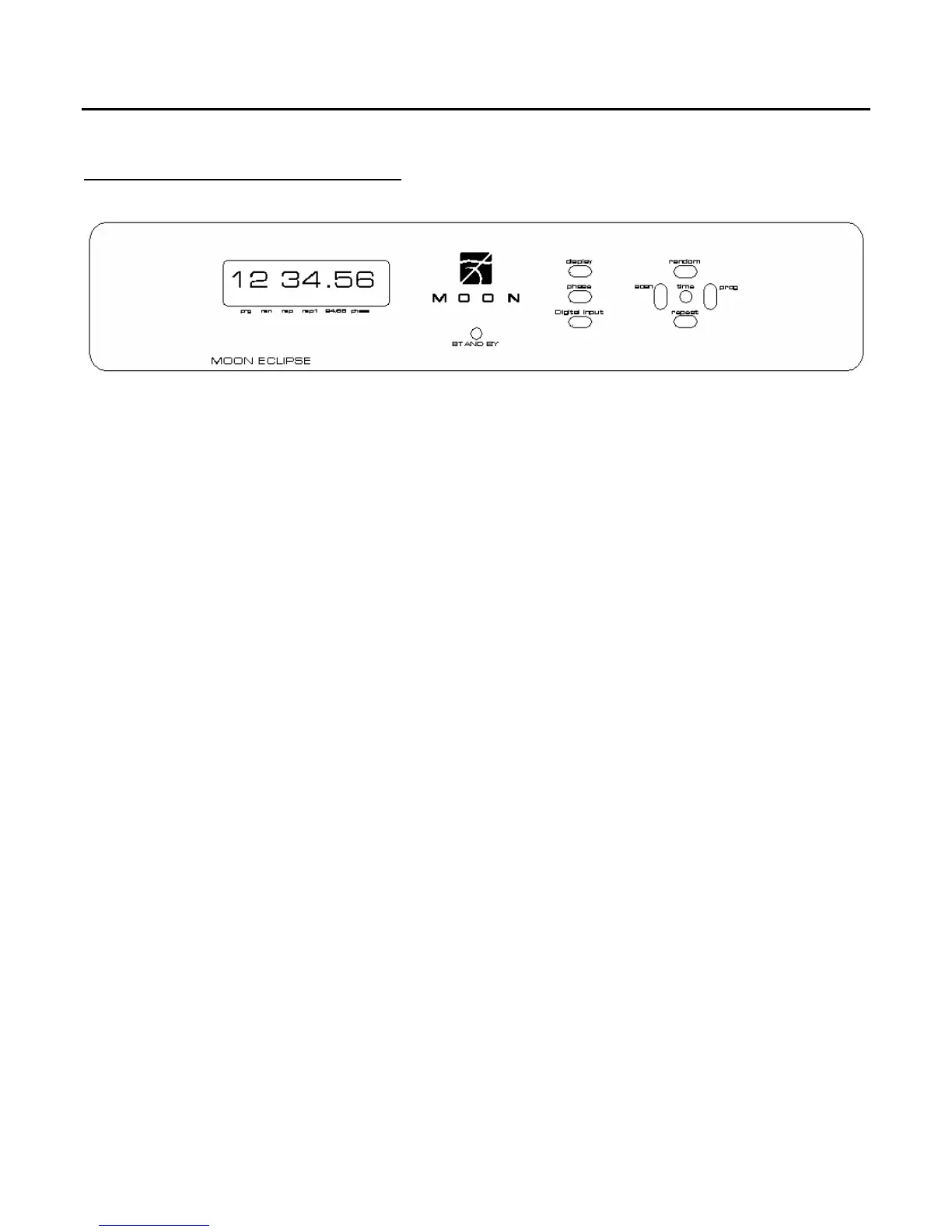
Figure 3: Front panel of Eclipse CD Player
The front panel will look similar to Figure 1 (above). The large digital display window indicates 1) the
track number of the compact disc currently playing and 2) either the elapsed time of the current track,
the elapsed time of the entire compact disc, or the remaining time of the entire compact disc. Which
one of these three (3) times displayed will depend of “Time” button which is described later in this
section. When a compact disc is loaded into the Eclipse and its table of contents is read, the total
number of tracks and total playing time will appear in this window. On the bottom of the display
window, from left to right, are six (6) indicator LED’s that will illuminate as follows:
‘Prg’ - when a programmed selection is playing
‘Ran’ - when “Random” play mode is engaged
‘Rep’ - when repeat mode is engaged for the entire compact disc
‘Rep1’ - when repeat mode is engaged for one (1) specific track
‘24/96’ - when the “Digital Input” for an external digital source is in use
‘Phase’ - when the phase invert function is engaged
Each of these above functions is described on the following page of this section.
The “Stand by” button disengages the input section from the rest of the Eclipse’s circuitry and turns
off the digital display. However, when in “Stand by” mode all digital and analog audio circuitry remains
powered up to help maintain optimal performance. The blue LEDs on both the Eclipse and its power
supply will remain illuminated when the Eclipse is in “Stand by” mode.
The “Display” button allows you to turn both digital displays, located on both the front and top panels,
on and off. The sonic performance of the MOON Eclipse CD Player may improve slightly when the
displays are turned off.
____________________________________________________________________________________
Front Panel Controls 11


 To Next Page