7
Rev. 1.0
08/12/2023
400-820-9661
STF-4X-ECX Hardware Manual
2.3 Installing Software
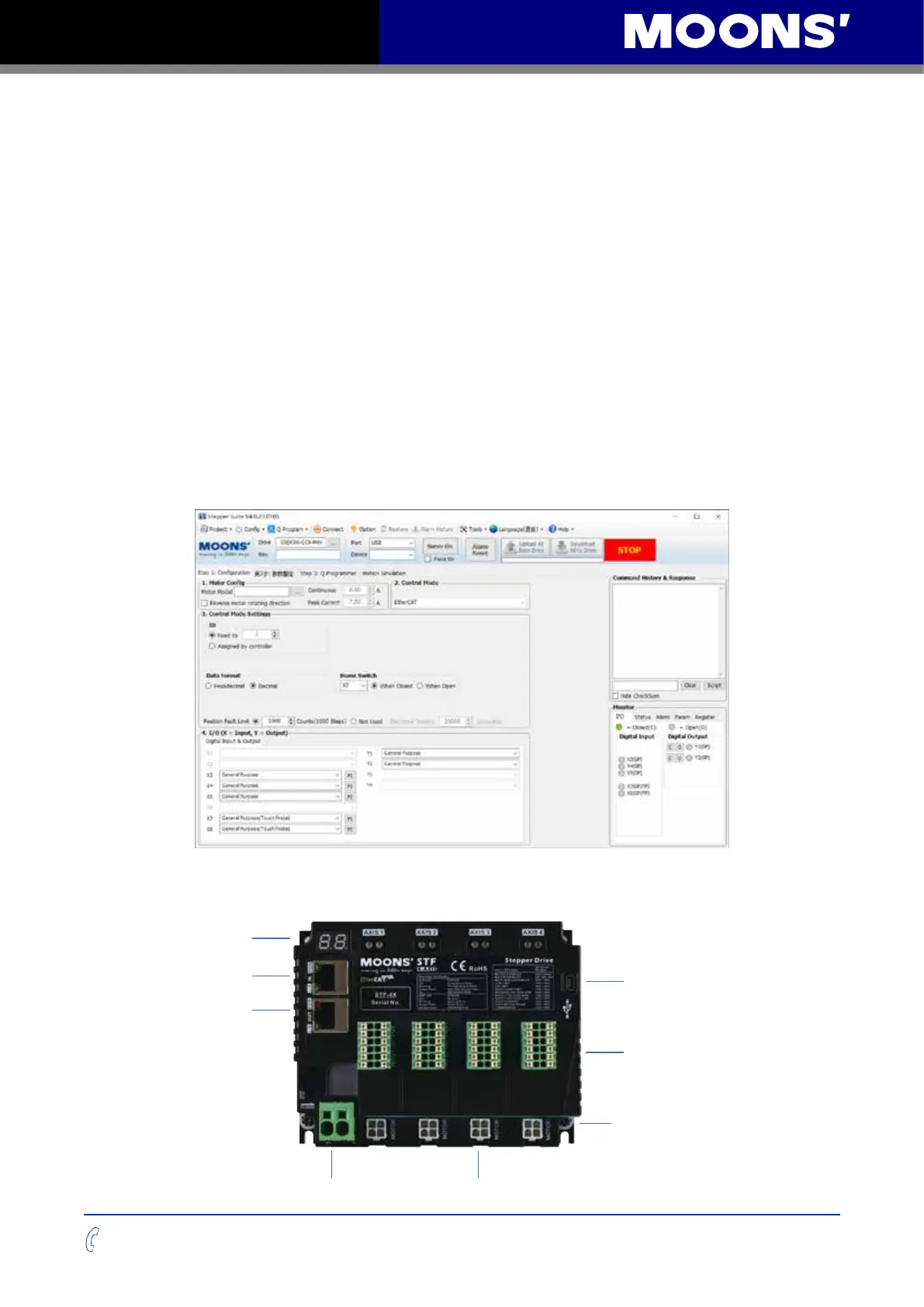
Stepper suite is the PC based software application used to configure, and perform servo
tuning, drive testing and evaluation of the step-servo products. System servo control gains, drive
functionality and I/O configuration are set with Stepper suite. It also contains an oscilloscope
function to help set the servo control gains.
• Download the Stepper Suite from the MOONS’ website and install it.
• Launch the software by clicking Start-----Programs ----MOONS’----Stepper Suite
• Connect the drive to PC by USB Mini-B cable. Please see the section below entitled
“Choosing the Right USB Port”.
• Connect the drive to the Power Supply.
• Connect the motor to the drive.
• Power up the drive.
• The software will recognize your drive, display the model and firmware version and be ready
for action.
The connectors and other points of interest are illustrated below:
EtherCAT Input
EtherCAT Output
USB
Communication Interface
LED
I/O Connector
Motor ConnectorPower Connector
Ground Screws


 To Next Page