EN
33
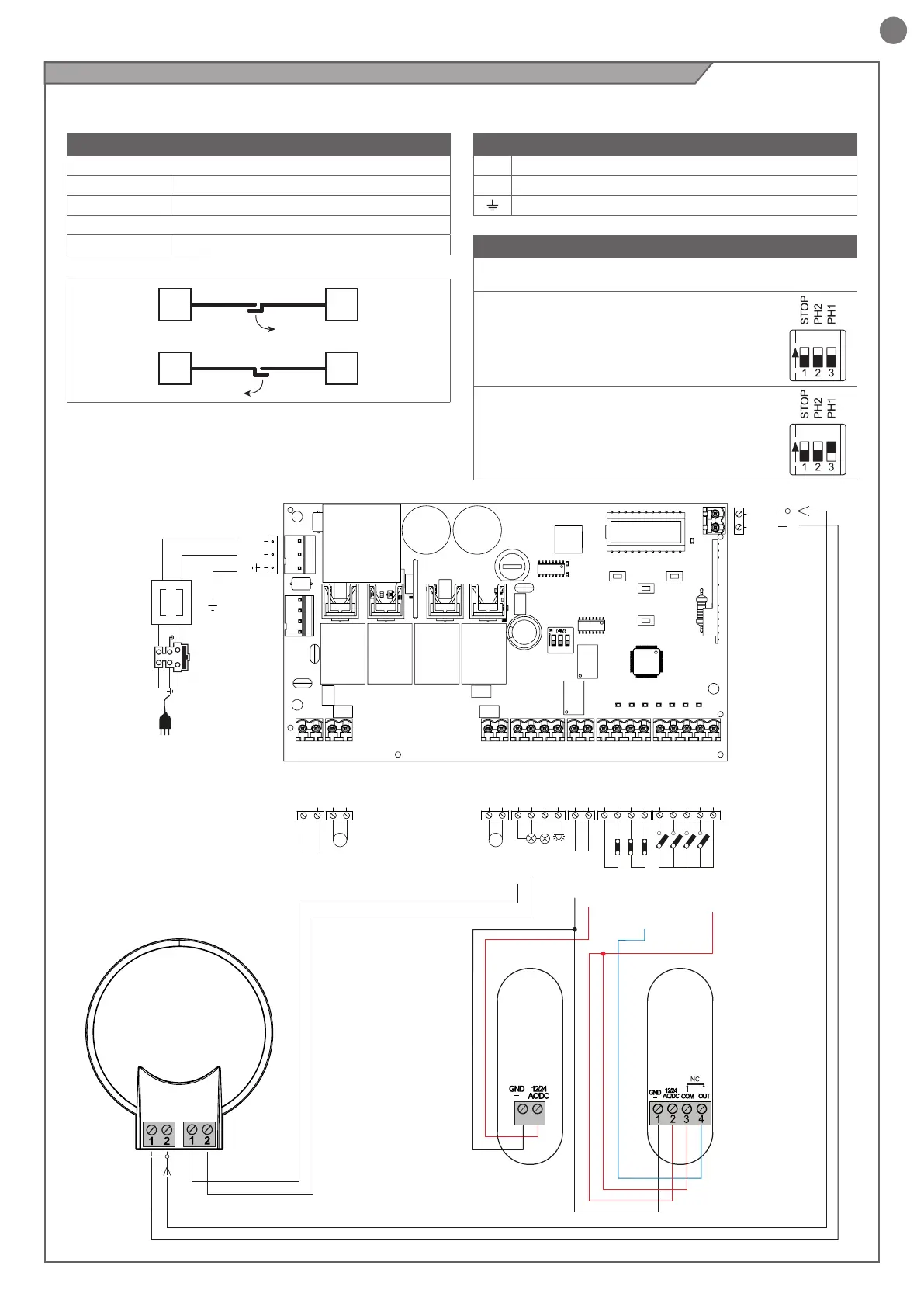
DIP SWITCH
Set on “ON” to disable inputs STOP, PH1, PH2
Eliminates the need to bridge the terminal board inputs.
WARNING - With the dip switch ON, the
safety devices are disabled
ON
OFF
EXAMPLE: With only 1 photocell
connected set STOP and PH2 to ON
ON
OFF
N
T1,6A
L
230Vac
50/60Hz
PHOTOTEST
OUTPUT LED
OPEN
PHOTOCELL 1
PHOTOCELL 2
CLOSE
PEDESTRIAN
STEP BY STEP
COMMON
STOP/EDGE
INDICATOR
NEGATIVE
24 VAC
24 VAC
M1 M2
FLASH
COM
24 VAC
24 VAC
M1+
M1-
M2+
M2-
COM
FLASH
IND ELEC
LED
NEG
PH POW
STOP
STOP
PH2
PH1
OPEN
CLOSE
SBS
PED
COM
BATTERY
SHIELD
ANT
POWER
SUPPLY
UP
+
-
MENU
SBS
DOWN
(RADIO)
COMMON
FLASH
SHIELD
ANT
COMMON
FLASH
PH1
RX
2
1
PH1
TX
MOTOR CONNECTION
Power supply connection terminal board
M1 + Power supply of motor M1 +
M1 - Power supply of motor M1 -
M2 + Power supply of motor M2 +
M2 - Power supply of motor M2 -
POWER SUPPLY CONNECTOR
L Power supply live 230 Vac (120 Vac) 50-60 Hz
N Power supply neutral 230 Vac (120 Vac) 50-60 Hz
Earth
WARNING - Before making the connections, ensure that the control unit is not powered up.
4.5 - Electrical connections
M1
M1
M2
M2



 To Next Page