EN
34
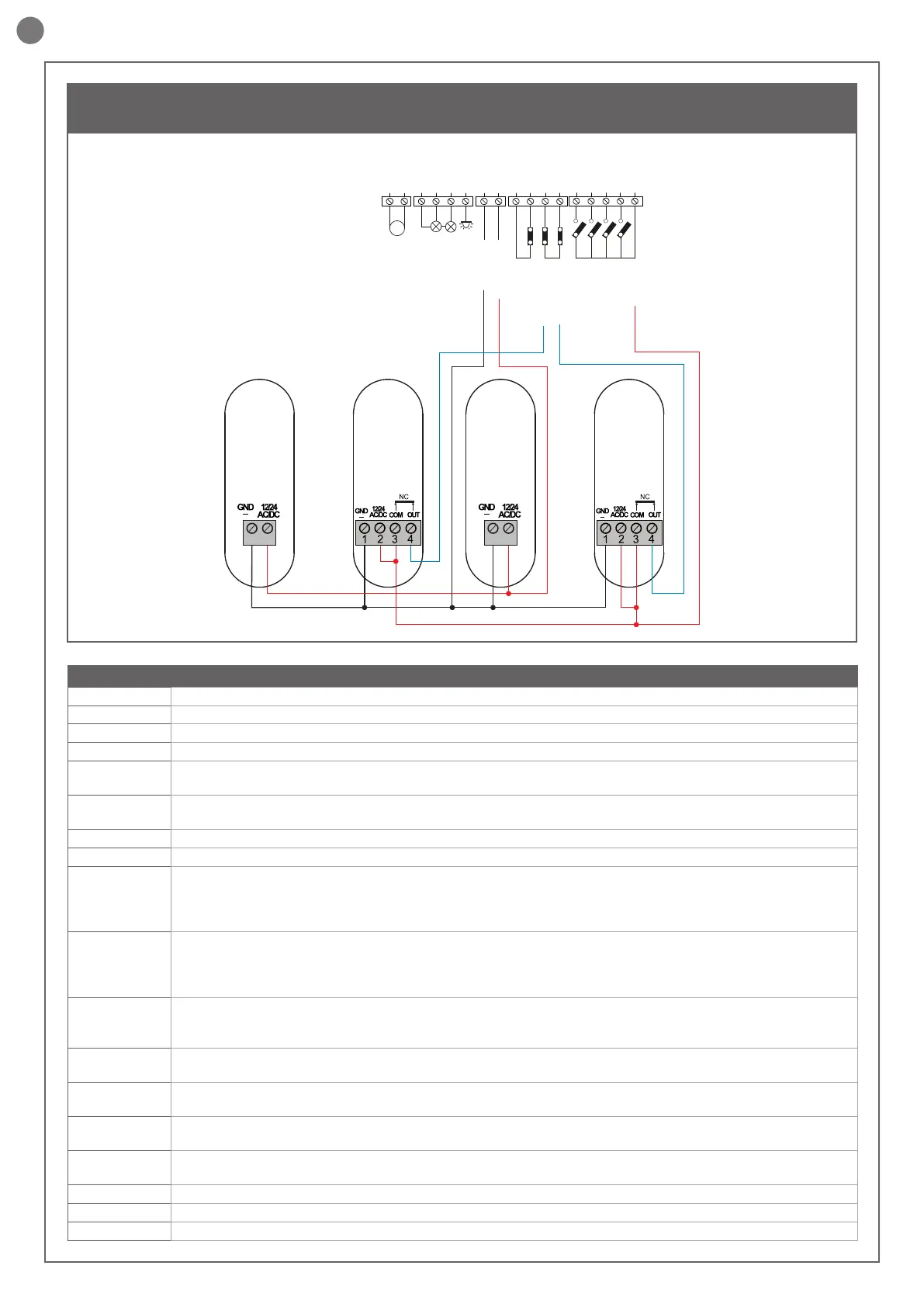
ELECTRICAL CONNECTIONS FOR 2 PHOTOCELLS
PHOTOTEST
OUTPUT LED
OPEN
PHOTOCELL 1
PHOTOCELL 2
CLOSE
PEDESTRIAN
STEP BY STEP
COMMON
STOP/EDGE
INDICATOR
NEGATIVE
M2
M2+
M2-
COM
FLASH
IND ELEC
LED
NEG
PH POW
STOP
STOP
PH2
PH1
OPEN
CLOSE
SBS
PED
COM
COMMON
FLASH
PH1
RX
PH1
TX
2
1
PH2
RX
PH2
TX
2
1
SAFETY AND CONTROL DEVICE CONNECTORS
24 VAC Accessories power supply 24 Vac without regulation, 200 mA (with battery operation output not active)
24 VAC Accessories power supply 24 Vac without regulation, 200 mA (with battery operation output not active)
COM Common for the FLASH-IND-LED outputs
FLASH Flashing light output 24Vdc (without regulation), maximum 15W
IND/ELEC
IND output for gate open indicator light 24 Vdc not regulated 5W MAX / Electric lock output 12Vac, 15VA maximum
selectable with parameter IN.D.
LED
Courtesy light output 24Vdc (without regulation), maximum 15W, controllable also via radio ON-OFF command (radio
channel 4 selecting fC.y. = 2, tC.y. = 0 )
NEG Photocell power supply negative
PH-POW Photocells PH1 and PH2 power supply positive; phototest can be selected with parameter tp.h. 24 Vdc, 250 mA
STOP
STOP safety device, NC contact between STOP and STOP (warning, with dip switch 1 ON the safety device input is o).
This input is classied as a safety device; the contact can be deactivated at any time, cutting out the automation system
and disabling all functions, including Automatic Closure.
Safety sensor edge, ON/OFF, NC contact or resistive 8K2 between STOP and STOP. Input selectable with parameter Ed.m.
PH2
Photocells (opening), NC contact between PH2 and COM (warning, with dip switch 2 ON the PHOTOCELL 2 safety
device input is o). The photocell is tripped at any time during opening of the automation system, halting operation
immediately; the automation system will continue opening when the contact is restored. In the event of intervention on
closure (parameter Ph.2. = 0) the device stops and on release re-opens
PH1
Photocells (closing), NC contact between PH1 and COM (warning, with dip switch 3 ON the PHOTOCELL 1 safety
device input is o) The photocell is tripped at any time during closing of the automation system, halting operation
immediately and reversing the travel direction
OPEN
OPEN command NO contact between OPEN and COM
Contact for the HOLD-TO-RUN function. The gate OPENS as long as the contact is held down
CLOSE
CLOSE command NO contact between CLOSE and COM
Contact for the HOLD-TO-RUN function. The gate CLOSES as long as the contact is held down
PAR
PARTIAL command NO contact between PAR and COM
Used to open the gate partially, depending on the software setting (not active in barrier/up-and-over mode)
SBS
STEPPING command NO contact between SBS and COM
Open/Stop/Close/Stop command, or as set in the software
COM Common for the PH2-PH1-OPEN-CLOSE-PAR-SBS inputs
SHIELD Antenna - shield -
ANT Antenna - signal -



 To Next Page