13
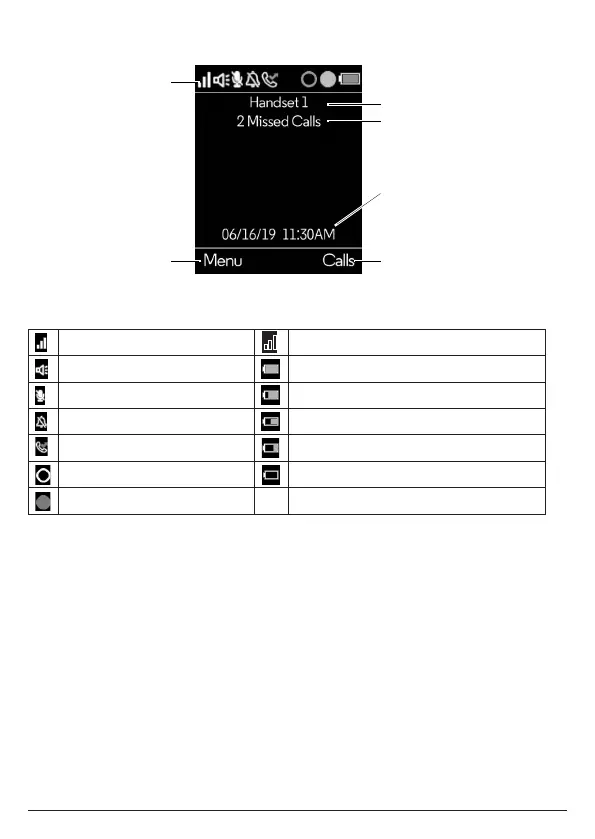
2.2 Overview of the handset display
Status bar icons
Signal icon Handset out of range
Hands-free on Batteries are fully charged
Mute Batteries are partially charged
Ringer o Batteries are running low
Missed call Batteries are almost fully discharged
Alexa message notification Batteries are empty
Alexa session in use
Handset notifications
Line In Use – When another handset is on a landline call.
Voicemail – If you have subscribed to a voicemail service oered by your telephone
service provider, Motorola AX handset can notify you when you have new voicemail
messages.
X Missed Call(s) – When you have unread new missed call(s).
Note
In the event your voicemail message notification gets out of sync with your
telephone service provider’s voice messaging system, you can manually reset it by
deleting the voicemail entry from your calls list. This will remove the notification
from the handset display; it does not delete your voicemail messages.
Status bar
Left soft key
information
Right soft key
information
Handset name
Date and time
Handset notifications
Getting to know your phone



 To Next Page
 Loading...