EasyManua.ls Logo

Motorola ROKR E1 - Play a Video Clip; Video Settings

Motorola ROKR E1
214 pages
Print Icon
To Next Page IconTo Next Page
To Previous Page IconTo Previous Page
Loading...
22
main attractions
2
Press the
CAPTURE
key to begin video
recording.
3
Press the
STOP
key to stop video
recording.
To delete the video clip and return to
the active viewfinder, press the
DISCARD
key.
To store the video clip, press the
STORE
key.
Your storage options are
Send in Message
or
Store Only
.
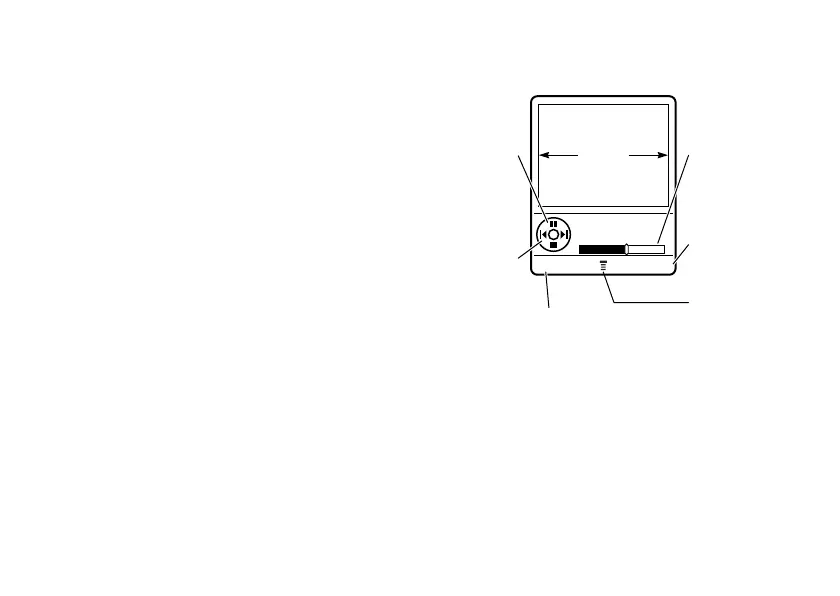
play a video clip
Find it:
Press
M
>
My MEdia
>
Videos
> video clip
The video clip displays in the playback screen.
video settings
Press
M
in the viewfinder to open the
Videos Menu
. This menu can include:
BACK DETAILS
Return to
previous screen.
Press
S
up/down to
pause/play.
Press
S
left/right to
skip to
previous/
next video
clip.
Press
M
to open
Videos Menu
.
Timer
Shows %
Played
See video
clip
information.
VIDEO
CLIP
AREA
Video Clip Name
Playing

Table of Contents

Other manuals for Motorola ROKR E1

Related product manuals