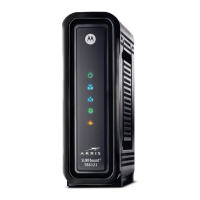
Quick Reference Guide: Motorola SB6121
Technical Operations Academy Page 4 of 5
Start-Up Sequence
The SB6121 goes through a series of steps when first connected to power and RF signal.
The SB6121 start-up steps are:
A. Power On Self Test (POST). If LED remains off, modem is faulty.
B. Scanning downstream frequencies.
C. Scanning upstream frequencies.
D. Downstream and upstream acquired. Modem processing for DHCP, TFTP, and TOD.
E. Ready. PC/Activity is solid when a CPE is connected and blinks when transmitting or
receiving data.
F. Powered off.
G. Modem is successfully registered but Network Access Control (NACO) is disabled via
DOCSIS® configuration file.
H. Performing firmware upgrade
DOCSIS 3.0 modems have dual-colored LEDs to visually determine if channel bonding and
Gigabit Ethernet is enabled.
Troubleshooting Tips
Rule out RF
Use the front panel LEDs as well as a SLM to rule out potential signal issues. If the RF levels are
acceptable, most issues can be corrected by restarting the cable modem. To restart the Motorola
SB6121:
1. Shutdown the computer
2. Unplug the cable modem from power and wait approximately 1 minute.
3. Plug the cable modem back into power.
4. Observer the LED light up sequence as detailed above.
5. Restart the computer.
LEDs and Error conditions
Light Turns off during Startup: Turns off during normal
operation:
RECIEVE
The downstream (RECEIVE) channel cannot
be acquired.
The downstream channel was
lost.
SEND
The upstream (SEND) channel cannot be
acquired.
The upstream channel was
lost.
ONLINE
IP registration was unsuccessful. IP registration was lost.
POWER
Verify the power connection. Verify the power connection.



 To Next Page
 Loading...