EasyManua.ls Logo

Motorola T280 - Using the Menu; Navigating to a Feature

Motorola T280
187 pages
Print Icon
To Next Page IconTo Next Page
To Previous Page IconTo Previous Page
Loading...
50
Using the Menu
Navigating to a Feature
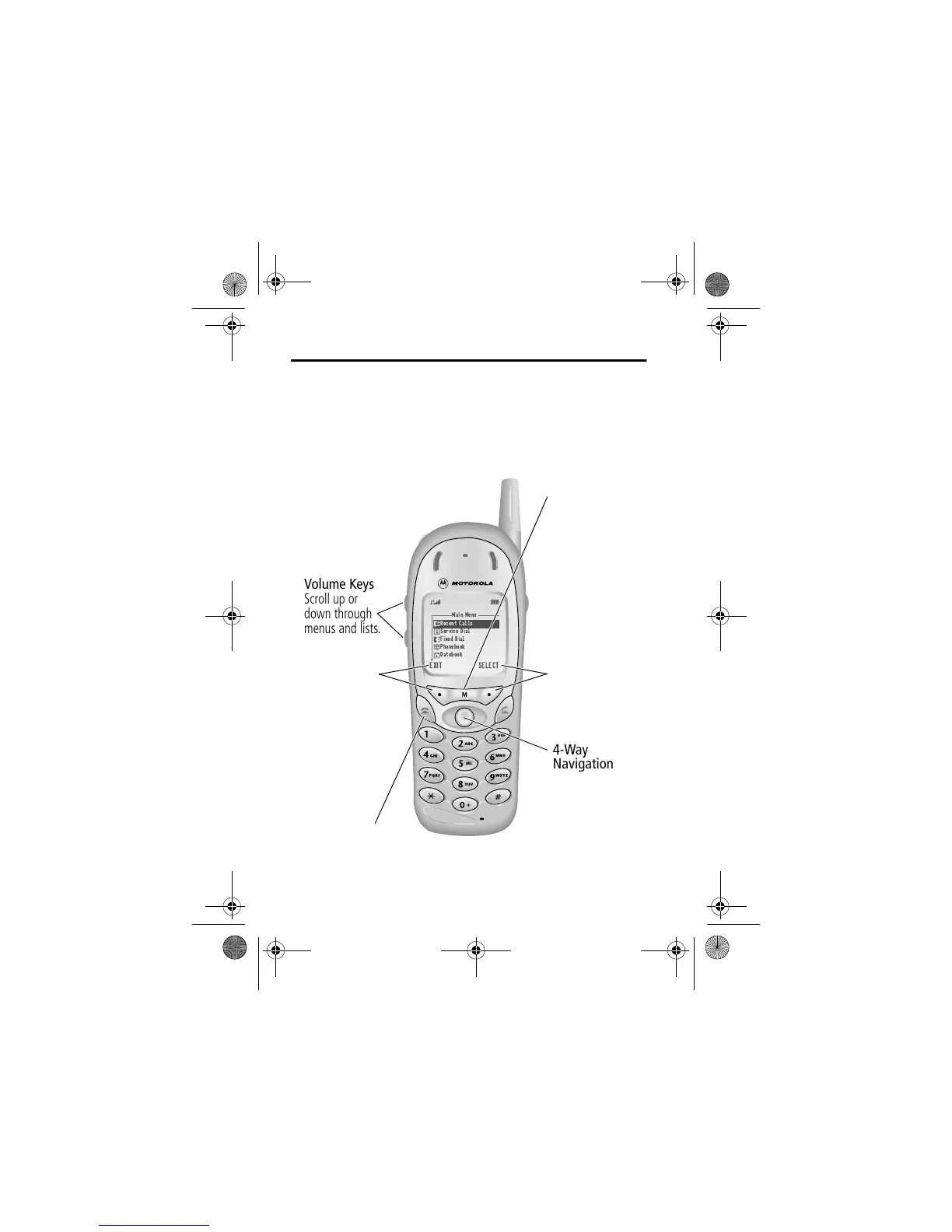
You can access many of your phone’s features by using these
keys to move through the menu system:
Main Menu
Recent Calls
Service Dial
Fixed Dial
Phonebook
Datebook
EXIT SELECT
Volume Keys
Scroll up or
down through
menus and lists.
4-Way
Navigation Key
Scroll up or down
through menus
and lists. Scroll
left or right to
cycle through and
set the value of
the highlighted
menu item.
Menu Key
Enter the menu
system, or open
a sub-menu, when
e
appears in the
bottom centre of
the display.
Right Soft Key
Perform the
function shown
in the lower right
corner of the
display (usually

the
highlighted
menu item).
Left Soft Key
Perform the
function shown
in the lower left
corner of the
display (usually
&
or

).
End Key
Exit the menu
system without
making changes,
return to the
idle display.
Left Soft Key
Perform the
function shown
in the lower left
corner of the
display (usually
&
or

).
User.Guide.GSM.book Page 50 Tuesday, February 5, 2002 6:17 PM

Table of Contents

Related product manuals