EasyManua.ls Logo

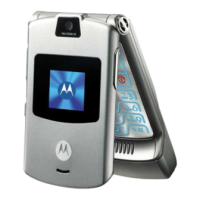
Motorola V3 SERIES - User Manual

Motorola V3 SERIES
50 pages
Print Icon
To Next Page IconTo Next Page
Loading...
Level 1 & 2 Service Manual
6809505A63-O
V3xx
Digital Wireless Telephone
V3xx UMTS 2100, GSM 900/1800/1900 GPRS

Questions and Answers

  • Z
    Zachary HarmonAug 17, 2025
    Why Motorola V3 Cell Phone won't turn on?
    • J
      Jasmine CordovaAug 17, 2025
      Your Motorola Cell Phone might not be turning on because the battery is either discharged or defective. Measure the battery voltage across a 50 ohm load. If it's less than 3.25 Vdc, recharge it. If it won't recharge, replace the battery. Also, check the battery connectors for misalignment or damage, realigning or replacing the battery if necessary. A defective keyboard assembly may also cause this issue; in this case, replace the keyboard assembly.
  • J
    joseph44Aug 19, 2025
    What to do if my Motorola V3 Cell Phone has poor reception?
    • K
      Kimberly HernandezAug 19, 2025
      If your Motorola Cell Phone has poor reception, check that the antenna pin is properly connected to the transceiver board assembly. If it is properly connected, try substituting a known good antenna. If the issue persists, it may be due to a defective transceiver board assembly.
  • J
    Joseph OrtizAug 22, 2025
    Why is the incoming call volume low on Motorola V3 Cell Phone?
    • H
      Heidi AndersonAug 22, 2025
      If the incoming call alert on your Motorola Cell Phone is distorted or the volume is too low, the transceiver board assembly might be faulty. Replace the transceiver board assembly.
  • E
    Edward LeonardAug 26, 2025
    What to do if internal charger is not working on Motorola V3 Cell Phone?
    • P
      pnguyenAug 26, 2025
      If the internal charger on your Motorola Cell Phone isn't working, test a selection of batteries in the rear pocket of the desktop charger and check the LED display for charging indications. If these are charging properly, then the internal charger is at fault and you should replace the transceiver board assembly.
  • C
    Cheyenne BrooksAug 27, 2025
    How to fix an erratic display on Motorola Cell Phone?
    • S
      sgutierrezAug 28, 2025
      To fix an erratic display on your Motorola Cell Phone, first check the flexible printed cable (flex) and its connector to ensure they are in good condition and fully pressed down. If the connector is faulty, replace the transceiver board assembly. If the connector is not at fault, the flip assembly might be defective, try temporarily replacing it with a known good one.
  • J
    Julia MonroeAug 31, 2025
    What to do if Motorola V3 doesn't recognize USIM?
    • C
      Christian WilliamsAug 31, 2025
      If your Motorola Cell Phone doesn't recognize the USIM, start by checking the USIM contacts for dirt and clean them if necessary. If the contacts are clean, try inserting a known good USIM to see if it's accepted. If the phone now recognizes the USIM, replace the defective USIM. If the USIM is not at fault, the flip assembly might be defective, try temporarily replacing it with a known good one.
  • N
    Nathan LewisSep 2, 2025
    Why is the receive audio weak on my Motorola Cell Phone?
    • S
      Steven GarciaSep 2, 2025
      Weak or distorted receive audio on your Motorola Cell Phone could be due to defective connections to or from the transceiver board assembly. Check the flex and flex connector from the flip assembly to the transceiver board assembly. If the flex is at fault, replace the flip assembly. If the flex connector is at fault, the flip assembly might be defective, try temporarily replacing it with a known good one. Also, make sure the antenna is installed correctly, substitute a known good antenna assembly if needed.
  • J
    Jack Barber Jr.Sep 5, 2025
    What causes Motorola Cell Phone not sensing flip open/close?
    • X
      xrodriguezSep 5, 2025
      If your Motorola Cell Phone isn't sensing when the flip is opened or closed, the flip assembly might be defective. Try temporarily replacing the flip assembly with a known good one.
  • L
    lisanobleSep 7, 2025
    How to fix weak transmit audio on Motorola V3 Cell Phone?
    • S
      Stephen WardSep 8, 2025
      If the transmit audio on your Motorola Cell Phone is weak, first verify that the microphone isn't obstructed while holding the phone. If the microphone is not obstructed, the microphone itself might be defective, you can try replacing it.
  • N
    Nichole HendersonSep 12, 2025
    Why is there no audio when using headset on Motorola Cell Phone?
    • R
      Robert WoodsSep 12, 2025
      If you're experiencing no or weak audio when using a headset with your Motorola Cell Phone, first ensure the headset plug is fully seated in the jack socket. If the headset is properly connected, the jack socket on the transceiver board assembly might be faulty. Replace the transceiver board assembly.

Summary

Technical Specifications

V3 xx Product Overview

General Phone Operation

Battery Handling and Information

Tools and Test Equipment for Repair

Disassembly Procedures

Removing and Replacing the Battery Door and Battery

Step-by-step guide for battery door and battery removal.

SIM and Memory Card Replacement

Rear Housing Replacement Procedure

Removing and Replacing the Rear Housing

Procedure for removing and replacing the rear housing.

Antenna Replacement Procedure

Removing and Replacing the Antenna

Steps to remove and replace the phone's antenna.

Transceiver Board Replacement Procedure

Removing and Replacing the Transceiver Board Assembly

Procedure for replacing the transceiver board assembly.

Flip Assembly Cover Replacement Procedure

Removing and Replacing the Flip Assembly Cover

Instructions for removing and replacing the flip cover.

Camera Assembly Replacement Procedure

Removing and Replacing the Camera Assembly

Steps for removing and replacing the camera module.

Display Module Replacement Procedure

Removing and Replacing the Display Module Assembly

Procedure for removing and replacing the display module.

Phone Identification Methods

IMEI Identification

Troubleshooting Guide

Troubleshooting Symptom Chart

Lists common symptoms, causes, and remedies for issues.

Software Operations and Programming

Exploded View Diagrams - Main Assembly

Exploded View Diagrams - Flip Assembly

Optional Accessories

Motorola V3 SERIES Specifications

General IconGeneral
NetworkGSM 850 / 900 / 1800 / 1900
DisplayTFT, 256K colors
Resolution176 x 220 pixels
Talk TimeUp to 7 h
Dimensions98 x 53 x 13.9 mm
Weight95 g
Secondary DisplayCSTN, 96 x 80 pixels
CameraVGA
BatteryLi-Ion 680 mAh battery
BluetoothYes
USBYes
ColorsSilver, Black, Pink, Blue
ModelMotorola V3

Related product manuals