6809505A63-O September 26, 2006 25
Level 1 and 2 Service Manual Disassembly
Removing and Replacing the Camera Assembly
1. Remove the battery cover, battery, USIM, antenna, rear housing, and transceiver board
assembly, flip assembly cover, and CLI lens cover as described in the procedures.
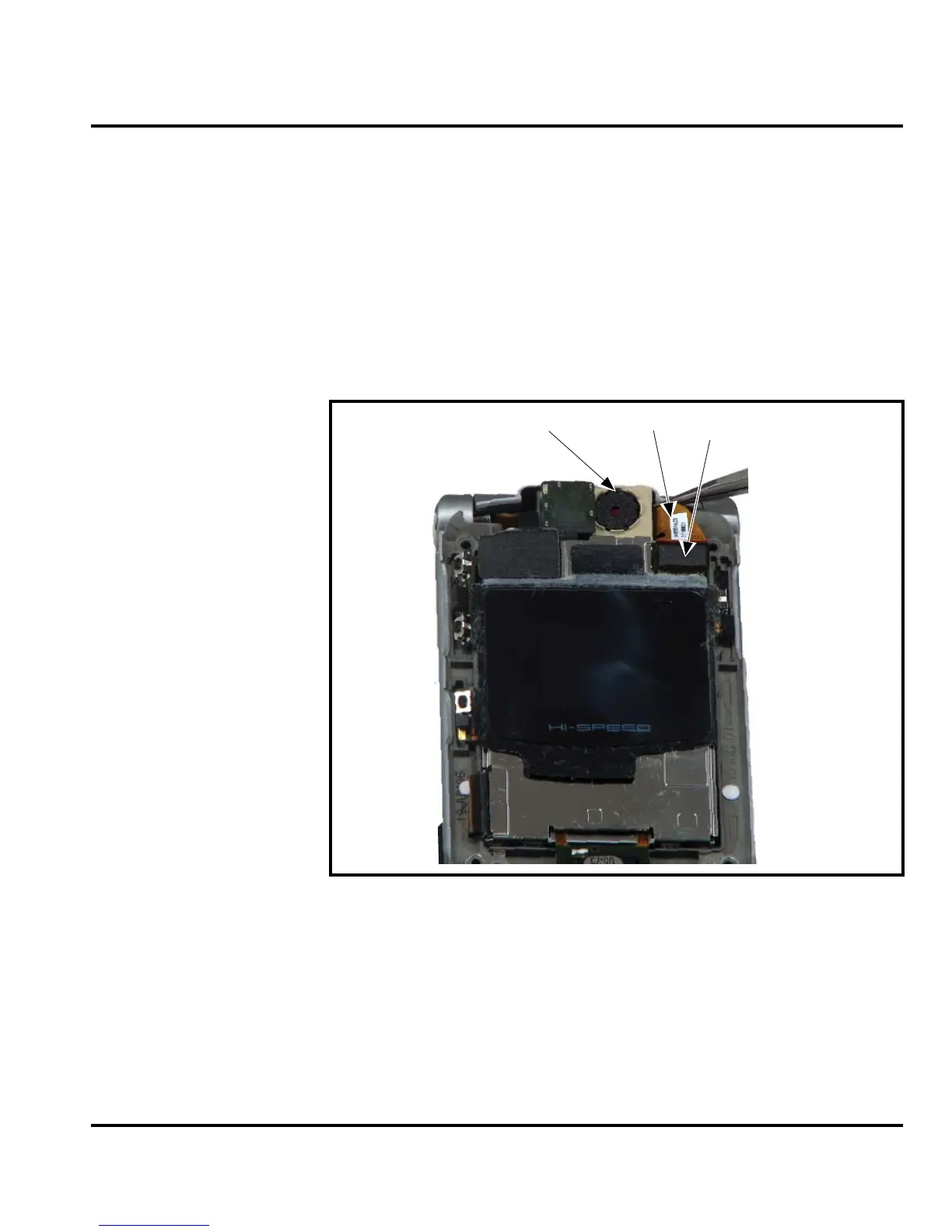
2. Unlock the ZIF connector and remove the camera assembly flex connector.
3. Carefully lift the camera assembly and flex out of the flip assembly
(see Figure 13).
4. To replace, carefully press the camera assembly into its slot in the flip assembly.
5. Insert the end of the camera assembly flex cable into its slot in the ZIF connector on the
flip display assembly. Avoid damage to the flex cable.
6. Replace the flip assembly cover, transceiver board, rear housing, antenna, USIM, battery,
and battery cover as described in the procedures.
G
The flexible printed cable (FPC) (flex) is easily damaged. Exercise extreme care when
handling.
Figure 13. Camera Assembly Removal
Camera Assembly
Camera Flex
ZIF Connector


 To Next Page
 Loading...