Corporate Headquarters: 1080 North 11th Street, San Jose, CA 95112 Phone: (408) 292-2214 Fax: (408) 292-2733
www.etorque.com
Page 20
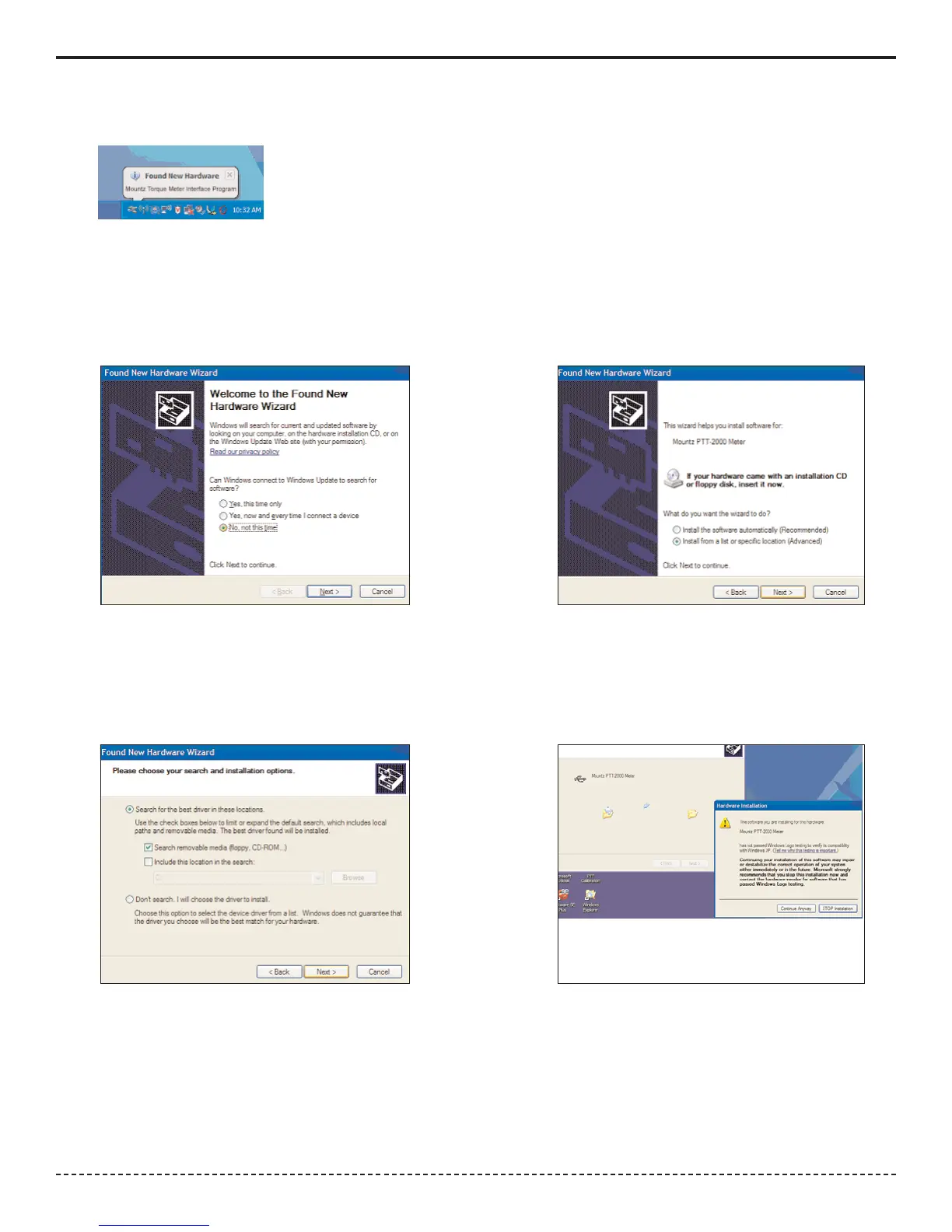
6. Shortly after the PTT is detected the following screen will appear. Do not allow Windows to search for software.
Click "No, not this time".
7. The CD should still be inserted from the installation, but if not insert it. Click "Install from a list or specific location"
and click Next Button.
6. 7.
8. Check the "Search removable media" box and click Next Button.
9. The USB drivers will begin to be installed. If a pop up window appears that the product has not passed the
Windows Logo Testing, just click "Continue Anyway". Mountz has tested the product with both the Home version
and Professional version of XP. You will not get this message if you are installing under Windows 2000.
8. 9.
5. After installation of the PTT Interface Program turn on the PTT unit. Connect the USB cable to the PTT
and connect the other end to the computer. The computer detects the device in the lower right side of the screen.


 To Next Page