Corporate Headquarters: 1080 North 11th Street, San Jose, CA 95112 Phone: (408) 292-2214 Fax: (408) 292-2733
www.etorque.com
Page 19
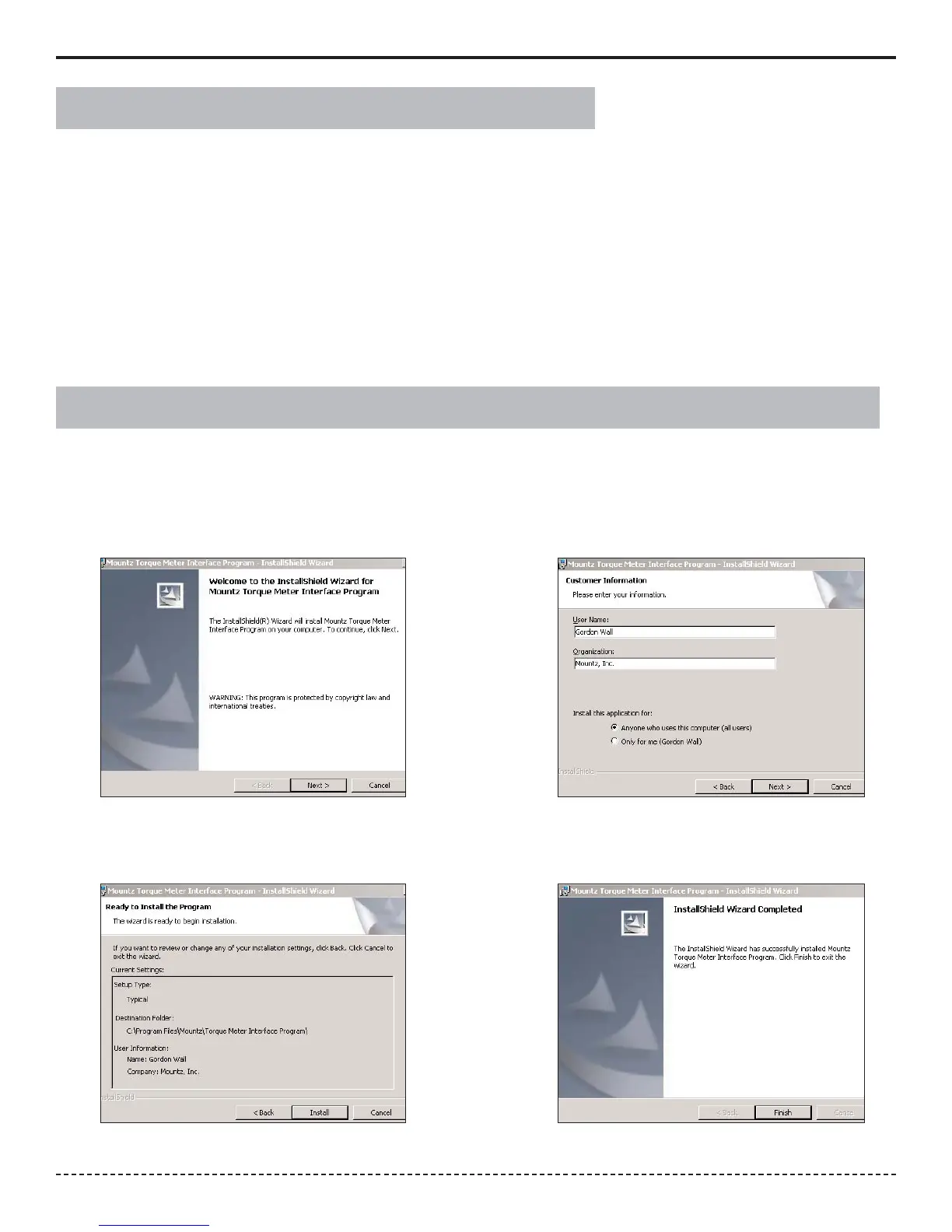
The interface software allows the operator to conduct Tool Tests, Sensor Calibration and Meter calibration.
1. Put the disk in and the Installation will start automatically. Click the Next Button to begin installation
2. Enter the required information and click Next Button.
1.
2.
3. Click install.
4. After the installation is successful just click Finish.
3.
4.
Installation of PTT “Mountz Torque Meter Interface Software”
There is no switch to turn on the PTT unit. Just press a key and the unit will power on. When the unit has not been
used for a designated time frame it will enter "Sleep Mode" if the Sleep Mode has not been disabled. The unit
features a processor that checks to see if a key pressed while it is in the Sleep Mode. There is no significant drain on
the batteries.
Note: Units with operating software Version K and beyond, the PTT can be shut-off by holding the Enter key for 7
seconds.
The PTT is powered using the high capacity Li-Ion batteries for a long battery life. The battery pack should last up to
30 hours with normal use and 16 hours with a brushless transducer with a maximum charge. The battery icon is
always on the display. It is filled in completely when fully charged and shows white space as the battery depletes.
Power On & Battery Operation


 To Next Page