NPort 5000 Series User Manual
Fixed
The NPort is not password protected, and “Search by IP address” was used to locate it.
Lock Fixed
The NPort is password protected, “Specify by IP address” was used to locate it, and the password has not
yet been entered from within the current Administrator session.
Unlock Fixed
The NPort is password protected, “Specify by IP address” was used to locate it, and the password has been
entered from within the current Administrator session. Henceforth during this Administrator session,
activating various utilities for this NPort will not require re-entering the server password.
Configuring NPort
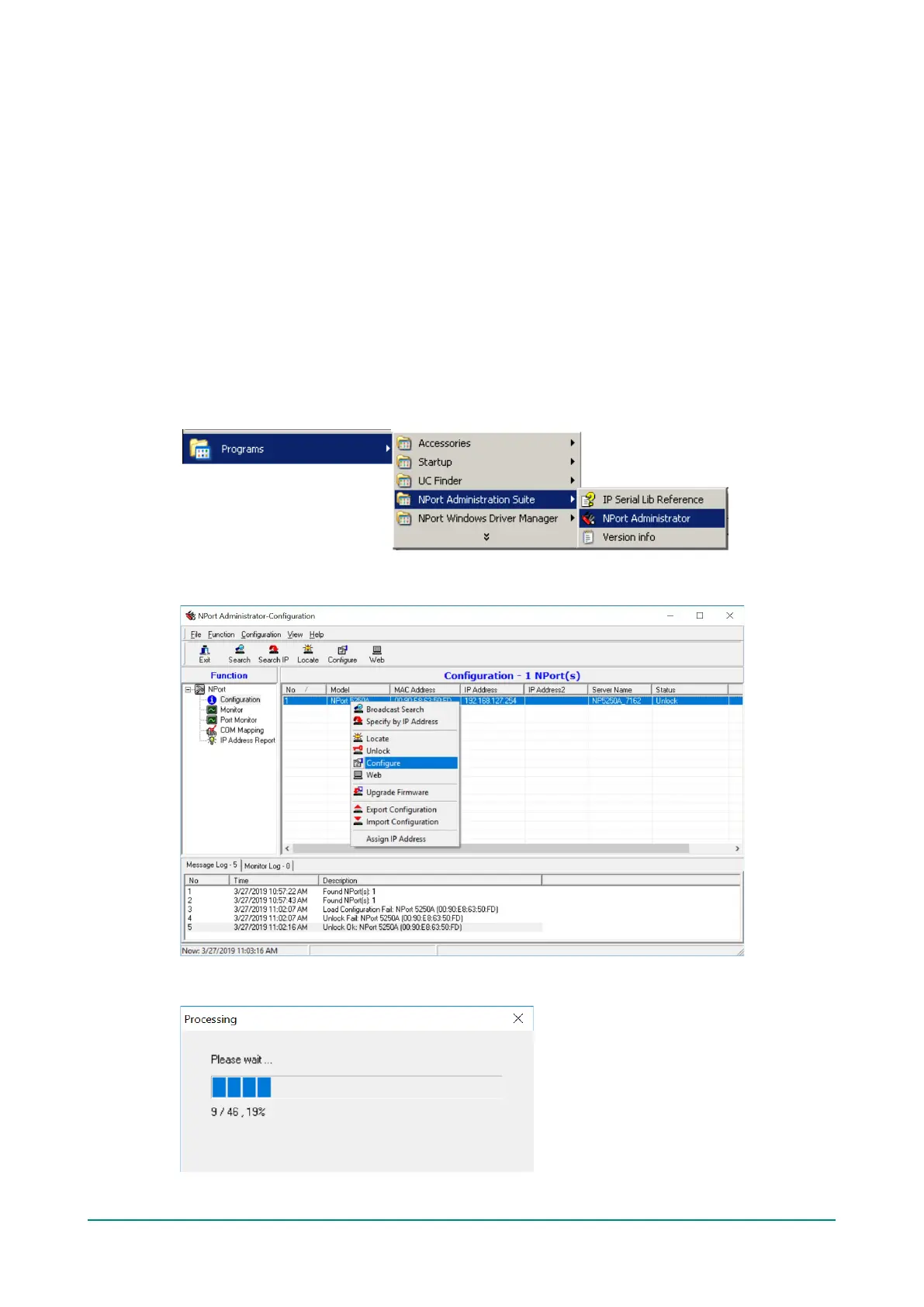
In this section, we illustrate how to access the NPort’s configuration utility. You should first make sure that
you can connect over the network from your computer to the NPort.
1. To start NPort Administrator, click Start
NPort Administration Suite NPort Administrator.
2. Unlock the NPort you wish to configure if it is password protected. Right click the NPort and select
Configure to start the configuration.
3. The progress bar shows that Administrator is retrieving configuration information from the specific
NPort.



 To Next Page
 Loading...









