26
7.1.2.6 HUDMenu
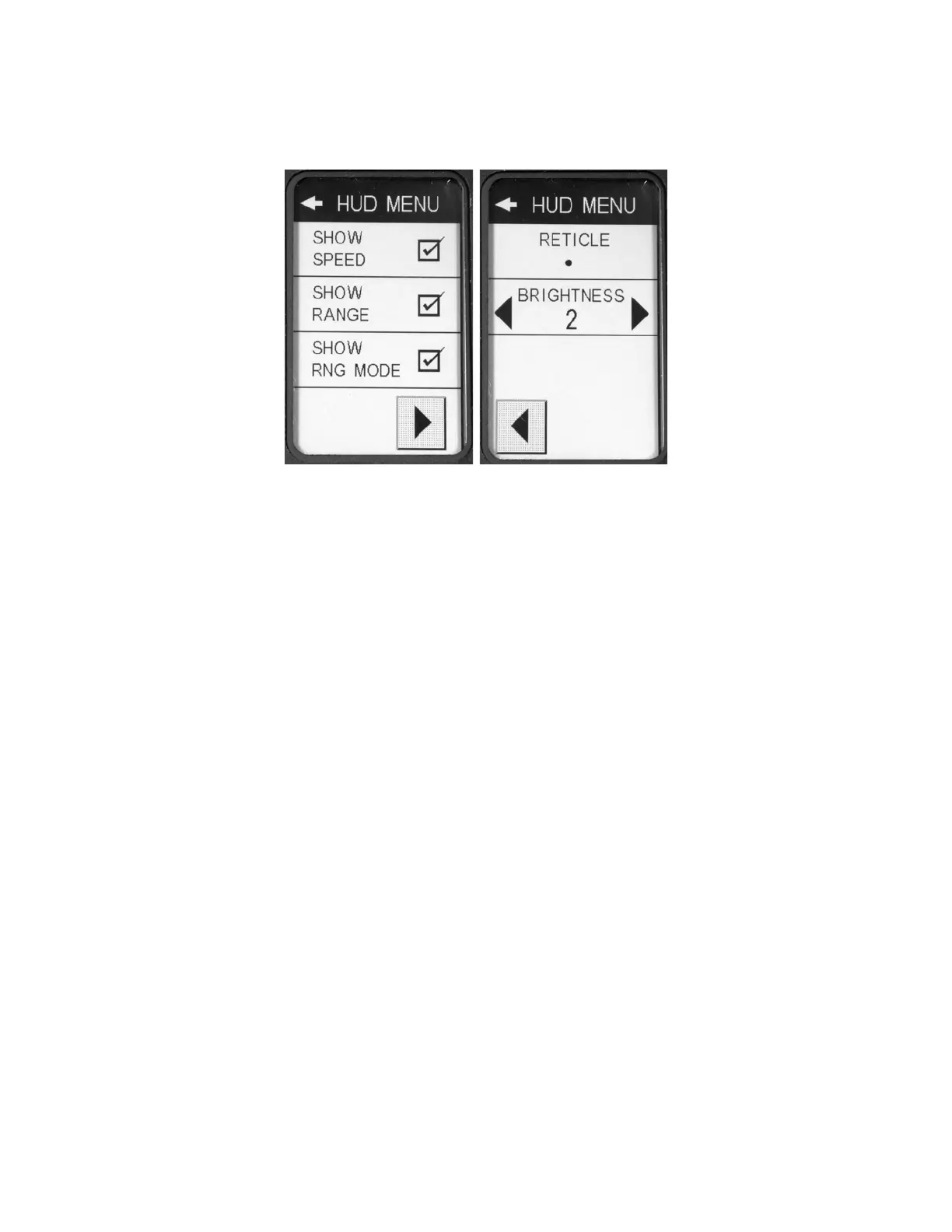
TheHUDMENU(Figure18)screensenablesHUDdisplaycustomization.
Figure18‐HUDMenuScreens
7.1.2.6.1 ShowSpeed
EnablingthisoptionwilldisplaythespeedassociatedwiththeacquiredtargetintheHUD,ifapplicable.
7.1.2.6.2 ShowRange
EnablingthisoptionwilldisplaytherangeassociatedwiththeacquiredtargetintheHUD.
7.1.2.6.3 ShowRangeMode
Enablingthisoptionwilldisplaythecurrentlaserranging
modeintheHUD.(Normalmodewillnot
displayanyicon.)
7.1.2.6.4 Reticle
TheRETICLETYPEpop‐upmenuiswhereyouwillselectwhichoverlaythelaserwillusefortargeting
vehiclesintheHUDsystem.Thefollowingaretheavailablechoices.
Crosshairs
Dot
Circle+
Dot
Crosshairs+Dot
7.1.2.6.5 Brightness
ThebrightnesssettingcontrolstheintensityoftheHUDoverlay.Theavailablevaluesrangefrom1
(dimmest)to5(brightest).
7.1.2.7 AudioMenu
TheAUDIOMENU(Figure19)screenisusedtoaccessallaudiorelatedsettings.


 To Next Page