16
7 LASERCONTROLSANDFUNCTIONS
7.1 TOUCHSCREENDISPL AY
Thetouchscreendisplayinterfaceallowsyoutoaccessvariousfunctionsofthelaser.Thetouchscreen
canbeusedwithorwithoutglovesandistransreflectivewhichmeansitactuallydisplaysbetterin
brighterconditions.
7.1.1 HomeScreen
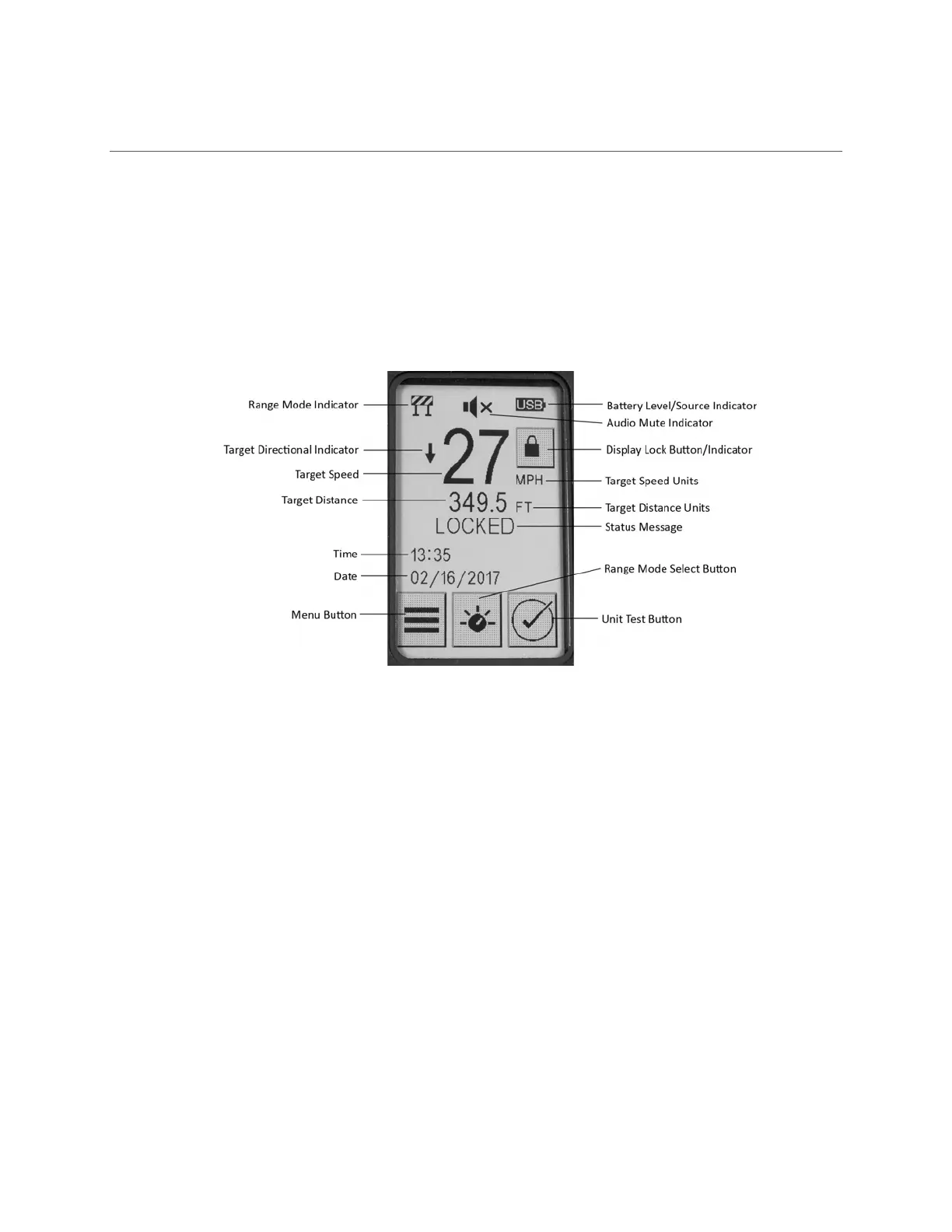
TheHOMEscreen(Figure8)istheprimarydisplayusedduringoperationofthe
laser.Thisscreen
displaysallofthecommonoperatinginformationalongwithdisplayingtheresultsofthelastlasershot.
Figure8‐HomeScreen
7.1.1.1 TargetSpeed
Themostrecentcapturedspeedisprominentlydisplayedforeasyreadability.Theunitsofspeed
measurementarevisiblenexttothetargetspeed.Ifthelaser is configuredinRangeOnlyoperational
mode,thisareawilldisplaythewordsRANGEONLYandthetargetspeedunitswillbeblank.
7.1.1.2 TargetDirectionIndicator
Thetraveldirectionofthelasttargetspeedcaptured is displayedtotheleftofthetargetspeed.
Approachingtargets(comingtowardyou)appearasarrowspointingdownwardwhilerecedingtargets
(goingawayfromyou)appearasarrowspointingupward.IfthelaserisconfiguredinRangeOnly
operational
mode,thisareawillbeblank.
7.1.1.3 TargetDistance
Thedistancemeasurementandtheunitsofmeasurefromthelasertothetargetatthetimetheshot
wastakenaredisplayedbelowthetargetspeed.Ifthelastshotfiredcouldnotdetermineavalidtarget,
thisareawillshowthe
textINVALID!.
7.1.1.4 StatusMessage
ThelaserstatusareawillshowthetextREADYwheneverthelaserisreadytoacquireatarget.Itwill
showthetextFIRINGwheneverthelaserisactuallyfiring.


 To Next Page