17
7.1.1.5 DisplayLockButtonandIndicator
Thedisplaylockstatusofthelastspeedcaptur edis displayedaswell.Thisbutton/indicatorcanbeused
tolockthereadingtothescreensoitcannotbeoverwritten.Ifthelock is engaged,thepadlockonthe
buttonappearslockedandthereticleintheHUD
willchangetoapadlock.Ifthelockisnotengaged,
thepadlockonthebuttonappearsunlocked.Toremovethelock,simplypressthelockbutton.The
lockedreadingswillberemovedoncethelockisdisengagedandthereticlewillreturntonormal.
7.1.1.6 MenuButton
Thisbuttone nables accesstothemenusystemtoconfigurelasersettings.
7.1.1.7 RangeModeSelectButton
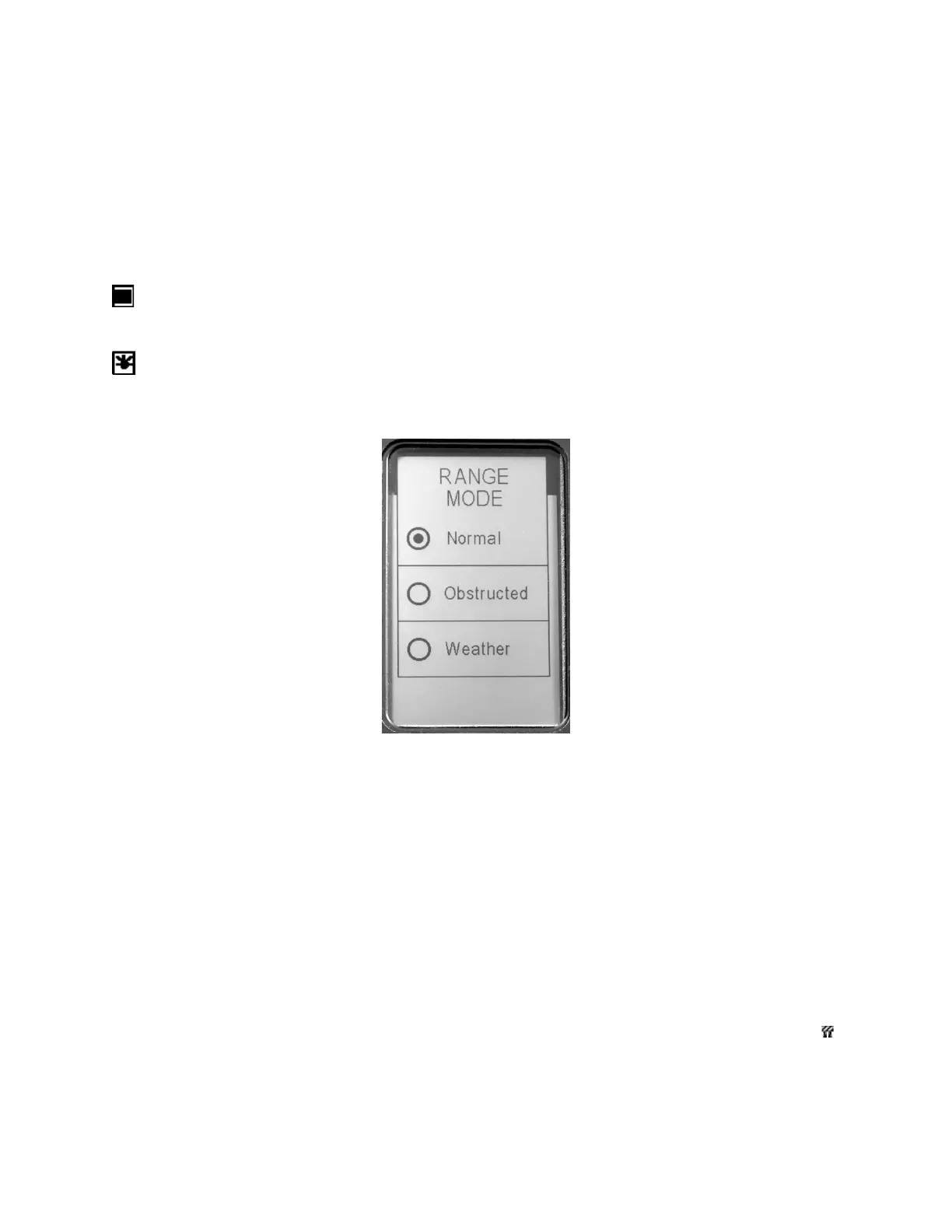
Therangemodebuttondisplaysapopupwindow(Figure9)thatsetstherangingmodeforthe
laser.Thesemodeswillvaryandallowfordifferentperformanceduetodistinctoperating
environments.
Figure9‐RangeModeSelectPopupWindow
7.1.1.7.1 NormalRangeMode
Thisrangemodeisthenormalmodeforthelaser.Noadditionalrestrictionsareplacedontothelaser
targetingfunctionality.Inthismode,thelaserwillacquiretargetsanywherebetweenthees tablished
minimumandmaximumrangesasenteredbyyou.Innormalrangemodetherewillbe
noicons
displayedasarangemodesettingontheHomescreenorintheHUD,ifsoenabled.
7.1.1.7.2 ObstructedMode
Thismodeisusedtoacquiretargetsoutbeyondaveryshortrange.Thismodeisusefulwhenshooting
thelaserfromlocationswithpotentialnearbyobjectinterference
orawindowincloseproximitytothe
operator.Thelasercontinuestooperateinnormalrangingmode,however,reflectionsthatarecloser
thantheminimumdistanceforthismodewillnotbeshown.Inthismode,thelaserwillacquiretargets
anywherefromapproximately30feetouttothemaximum
rangesetting.Theobstructedmodeicon()
willappearontheHomescreenandintheHUD,ifenabled.


 To Next Page