GB - 14
• IftheBlueCompactalreadyhassomephonebookrecordsinthecurrentprofile,awarningmessagewillappear.
• Press toconfirmthephonebookerasingorpress tocancel.
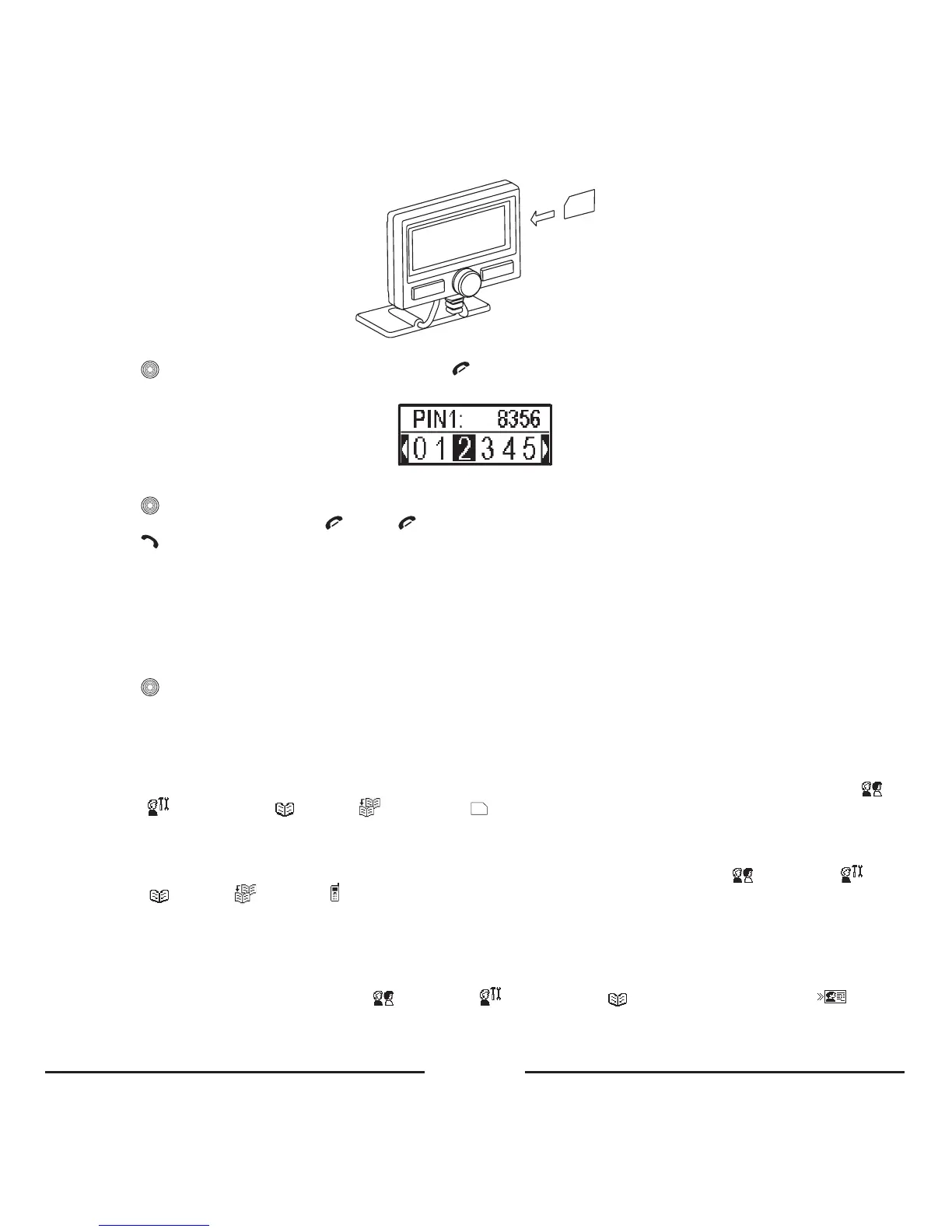
• IftheSIMcardisPINcodeprotected,thescreenkeypadwillappear:
• EnterthePINcodebyturningthecentralbuttontotheleftortherighttoselectdigits.
• Press toconfirmyourchoice.Theselecteddigitswillappearonthetoppartofthedisplay.
• Todeleteanincorrectdigit,press orhold forafewsecondstodeletealldigits.
• Press toconfirmthePINcode.
• Thephonebookcopyingwillstartaccordingly.Theexistingphonebook,storedintheBlueCompact,willbeerased
automatically.
• IfyourSIMcardisnotPINcodeprotected,thephonebookcopyingprocesswillstartautomatically.
• Assoonasthephonebookcopyingprocessisfinished,youcanremovetheSIMcardfromtheholder.Toreleasethe
cardfromtheholder,youshouldpressit.
• InserttheSIMcardinyourmobilephoneandswitchiton.
• ActivatethemenuoftheBlueCompactandselectBluetooth
®
a Connection.
• Press toconfirmyourchoice.
• Theconnectionshouldberestored.
2.2 Copy the phonebook to the SIM card, and copy the SIM card contents via Bluetooth
®
Inyourmobiletelephone,youwillfindyourphonebookandan“Options”menu.Inthis“Options”menu,youcanchooseto
copythecontentsofthephonebooktotheSIMcard.ThephysicalmemoryontheSIMcardisoften250names&numbers.
Afterthiscopy,pleasemakesurethatthephoneisconnectedtothecarkitviaBluetooth
®
.Selectrespectively:Profiles
aSettings aPhonebook aCopy aSIMcard inthemenu.Thephonebookwillnowbecopiedintoyour
carkit,ifyourmobilephonesupportsthisfeature.
2.3 Copy the phonebook records saved in your phone memory via Bluetooth
®
Makesurethat thephoneisconnected tothecarkitviaBluetooth
®
.Selectrespectively: Profiles a Settings a
Phonebook aCopy aPhone inthemenu.Thephonebookwillnowbecopiedintoyourcarkit,ifyourmobile
phonesupportsthisfeature.
2.4 Send business cards from the phone to the carkit.
IfyourphonesupportstheBluetooth
®
OPPprofile,itcansendbusinesscardstothecarkit.Dependingonyourmobile
phonetype,thiscanbeone-by-oneorallbusinesscardsatonce.Firstlyyouhavetosetthecarkitinreceivingmodefor
businesscards.Selectrespectively:Profiles
aSettings aPhonebook aReceivebusinesscard .The
carkitisnowwaitingforthebusinesscardsthathavetobesentfromyourphone.Pleasechecktheuser’smanualofyour
phoneformoreinformationonhowtosendbusinesscards(Normallythiscanbedonefromtheoptionsmenuwhenyou









 To Next Page