GB - 8
4. Professionalbuilt-inconnection:Immediatelytothecar’selectronicsystemviasystemcablePoMusic100(Optional)
• Takeoutyourcarradioaccordingtothespecificationsofyourcarandyourradio.
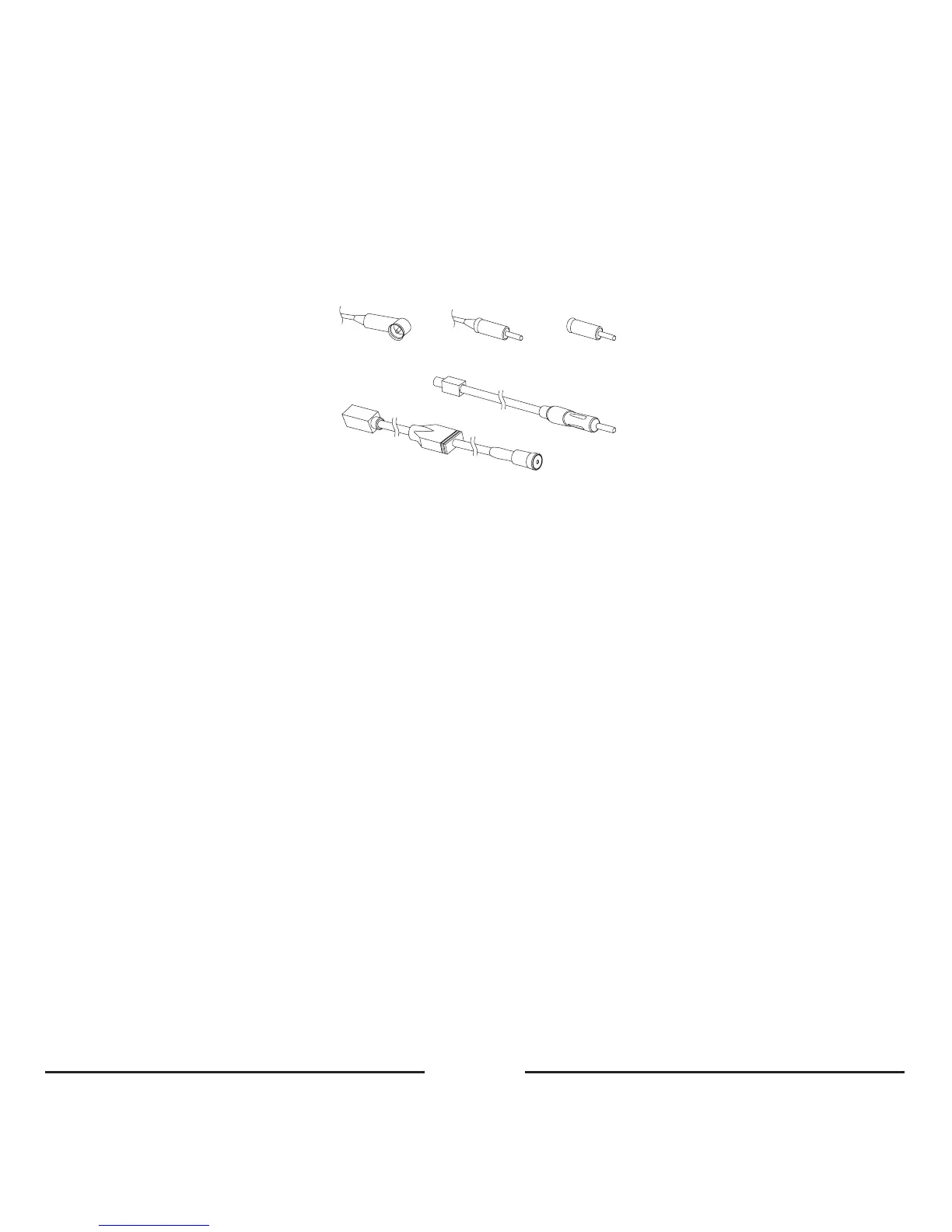
• UnplugtheantennaplugfromyourradioandconnectittothefemaleantennasocketofyourProMusic100.
– IfthecarhasDINtype(1),maketheconnectionviatheconversionplug(3).
– IfthecarhasISOtype(2),maketheconnectiondirectly.
– IfthecarhasFAKRAtype,maketheconnectionviatheconversionplug(4.2).
1 2 3
4.2
4.1
• PlugthemaleantennaplugfromtheProMusic100intothecarradio.
– IfthecarhasDINtype(1),maketheconnectiondirectly.
– IfthecarhasISOtype(2),maketheconnectionviatheconversionplug(3).
– IfthecarhasFAKRAtype,maketheconnectionviatheconversionplug(4.1).
• Selectafrequencywiththe4dipswitchesontheProMusic100.Thefrequencytableisprintedonthebacksideof
yourProMusic100.Pleasetakeacloselookatthisfrequencytable!
• ConnecttheISO-plugtotheradioandspeakers.IfyourcarisprovidedwithplugsotherthanISO-plugs,youwill
needadapters.Thesearenotincluded.
• Guidethewirewiththebuttonandthe2.5mm/3.5mmjackplugtotheplacewhereyouraudiodeviceislocated.
• Selectyourchargingwire,forminiUSBoriPod,andconnectthistotheProMusic100.Guidethiswirealsotothe
placewhereyouraudiodeviceislocated.
• PlaceyourProMusic100intheholebehindyourcarradioandplaceyourcarradiobackintoitsplace.
Use with audio device
• ConnectthejackplugofyourProMusic100toyouraudiodevice.
• Connectyourchargingcabletoyourmusicdevicewhenyouneedtochargethebattery.
• SelectthefrequencyoftheProMusic100onyourcarradio(pleasestorethisfrequencyasapreset).
• PressthecontrolbuttononthecableofyourProMusic100toswitchitonoroff.









 To Next Page