TEMPO
®
/ TEMPO/PLUS
®
/ TEMPO/REMOTE
®
/ TEMPO/EXT
®
• Owner’s Manual
18
TEMPO
®
/ TEMPO/PLUS
®
/ TEMPO/REMOTE
®
/ TEMPO/EXT
®
• Owner’s Manual 19
Installing the TEMPO/REMOTE
®
Holder
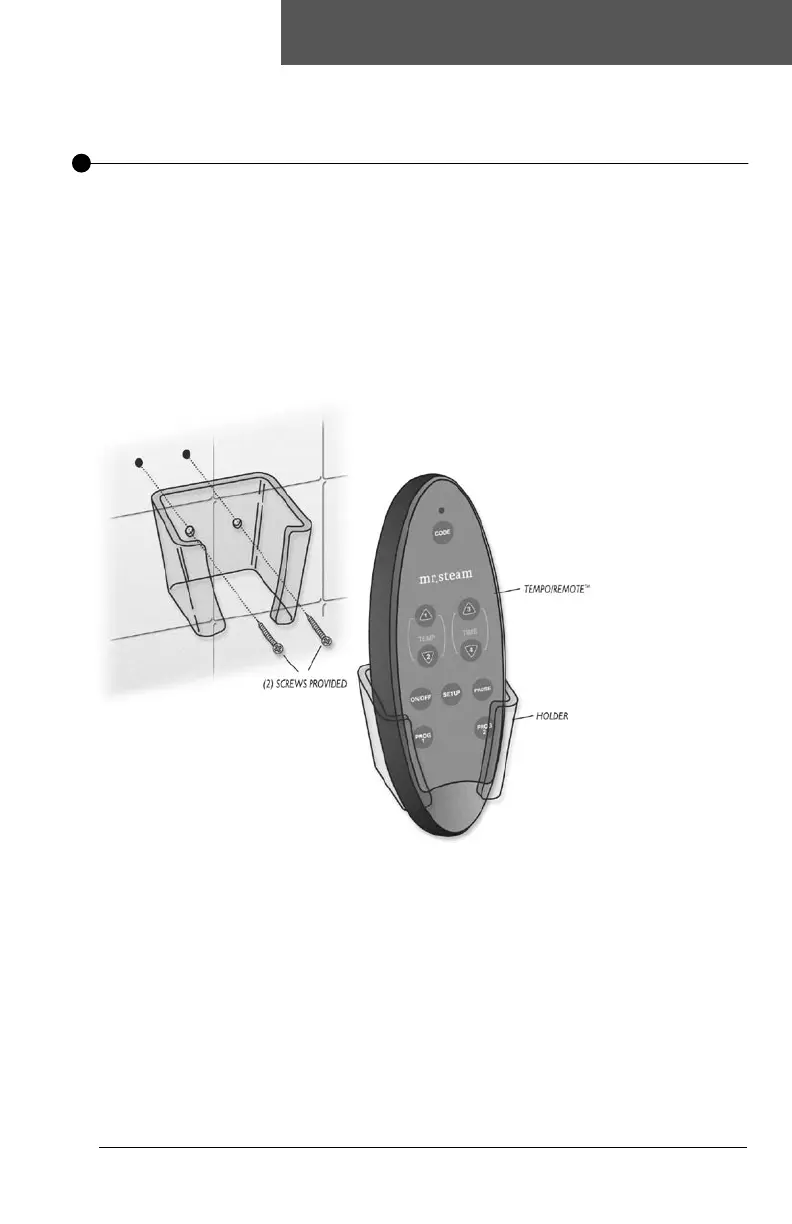
Mount the holder in a location away from direct steam emission.
Secure the holder to a wall so the TEMPO/REMOTE
®
is oriented in the upright
position as shown. Determine if the two screws provided are suitable for the
installation conditions.
Use alternate hardware or use with plastic anchors as required by installation
conditions.
Seal screw holes in the wall against moisture as required.
A holder is provided with the TEMPO/REMOTE
®
Control as an optional convenience.


 To Next Page