INTERSECTOR Microwave Motion and
Presence Sensor Installation Instructions
EXPLANATION OF CHANGES (CONTINUED)
Rain Failsafe (continued)
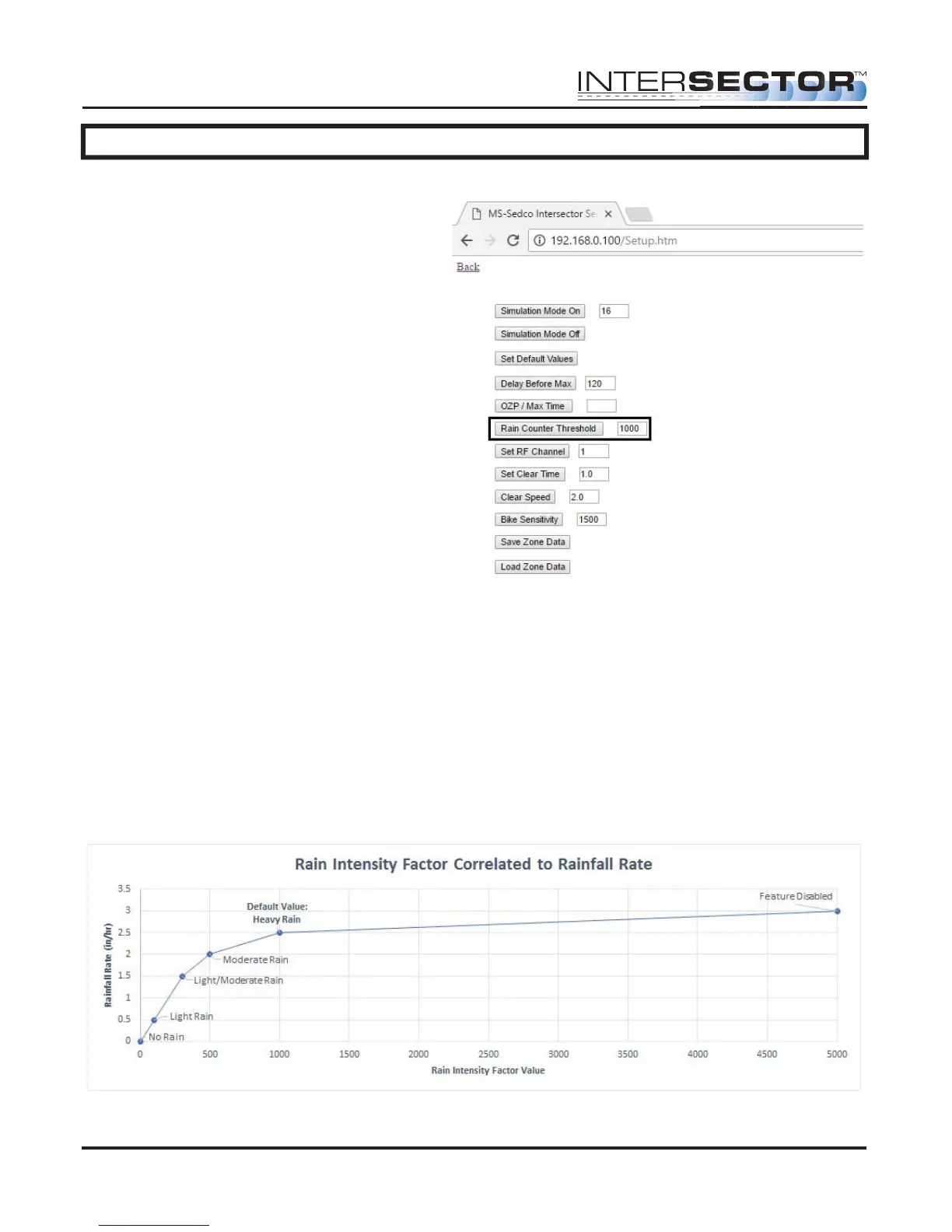
If this exceeds the Rain Counter
Threshold, which can be found and
adjusted on the Setup page, as shown
in Figure 2, the message “RAIN” is
displayed just to the right of Rain
Intensity Factor. When this happens, the
INTERSECTOR and associated TCIB(s)
will go into RECALL. This will continue
until the Rain Intensity Factor has
dropped below the Rain Counter
Threshold and remains there for 5
minutes.
The Default setting for Rain Counter
Threshold is 1000, which specifies
heavy rainfall, as shown on the graph in
Figure 3. Blowing winds that cause rain
to be directed at the INTERSECTOR
could also affect the Rain Intensity
Factor. Increasing the Rain Counter
Threshold will decrease sensitivity to
rain. Decreasing the Rain Counter
Threshold will increase rain sensitivity.
The maximum accepted value is 5000.
To disable rain detection, set the Rain
Counter Threshold to 5000.
Figure 2
Figure 3
MS Sedco INTERSECTOR Installation Instructions Page Addendum-2 INTERSECTOR-1.9Uv092717



 To Next Page