
 To Next Page

T
Tara BensonAug 1, 2025
What to do if MSA Test Equipment lamp stops flashing after 5 minutes?
- JJulie ScottAug 1, 2025
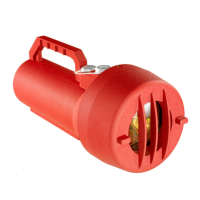
If the MSA Test Equipment lamp stops flashing after 5 minutes, press the on/off button again to resume flashing.

What to do if MSA Test Equipment lamp stops flashing after 5 minutes?
If the MSA Test Equipment lamp stops flashing after 5 minutes, press the on/off button again to resume flashing.
What to do if during operation the MSA Test Equipment lamp stops flashing and the charge indicator is solid red?
If the MSA Test Equipment lamp stops flashing during operation and the charge indicator is solid red, this indicates that the battery has been discharged. Recharge the battery using the GM battery charger in a non-hazardous location.
Why is the RED LED on for one minute when activating the push button on my MSA Test Equipment?
When activating the push button, if the RED LED is on for one minute on your MSA Test Equipment, it could be due to several reasons: * The battery needs charging. * The battery was just plugged in and has not been fully charged. * The battery is not connected. * The wrong charger may be in use instead of the TL105 charger.
What to do if during charging the charge indicator lamp flashes yellow and charging is not complete after 4 hours on MSA Test Equipment?
If, during charging, the charge indicator lamp flashes yellow and charging is not complete after 4 hours for your MSA Test Equipment, the unit may be too hot. Put the lamp into a cooler location or wait until the indicator turns green; this could take more than 10 hours.
What to do if MSA Test Equipment test lamp flashes but is unable to trigger detector?
If the MSA Test Equipment test lamp flashes but is unable to trigger the detector: * Verify that rotary switch settings are set as specified in Table 2. * Ensure the reflector and lens are clean; see Sections 1.4 and 5.2. * Shake the lamp to create intermittent illumination of the detector; see Section 2.0.
What to do if MSA Test Equipment test lamp does not flash, and battery has been recharged for 4 hours?
If the MSA Test Equipment test lamp does not flash even after the battery has been recharged for 4 hours, the lamp filament may be broken. Check the power and lamp connectors.
What to do if during charging the charge indicator lamp at the front of the MSA Test Equipment unit flashed red?
The test lamp must be returned to General Monitors for a replacement battery pack.
Highlights critical warnings regarding battery care and eye safety when operating the test lamp.
Describes the rotary switch used to configure the test lamp for different flame detector types.
States the TL105 uses a 12V rechargeable battery and mandates keeping it docked on the charger.
Outlines routine maintenance, including keeping the lamp charged and the lens clean, and battery life considerations.
Details the process for recharging the battery in a non-hazardous area and the charge indicator functionality.
Lists the technical specifications of the TL105 test lamp, including electrical, environmental, and performance data.
Details certifications by ATEX, IECEx, CSA for hazardous locations, including protection methods and area classifications.
 General
| Brand | MSA |
|---|---|
| Model | General Monitors TL105 |
| Category | Security Sensors |
| Language | English |