pend/sleep mode, but f the button s pressed for more than four
seconds, the computer s turned o.
Restore On AC Power Loss
Ths tem speces whether your system wll reboot after a power falure or nterrupt
occurs. Settngs are:
[O] Always leaves the computer n the power o state.
[On] Always leaves the computer n the power on state.
[Last State] Restores the system to the status before power falure or nterrupt
occurred.
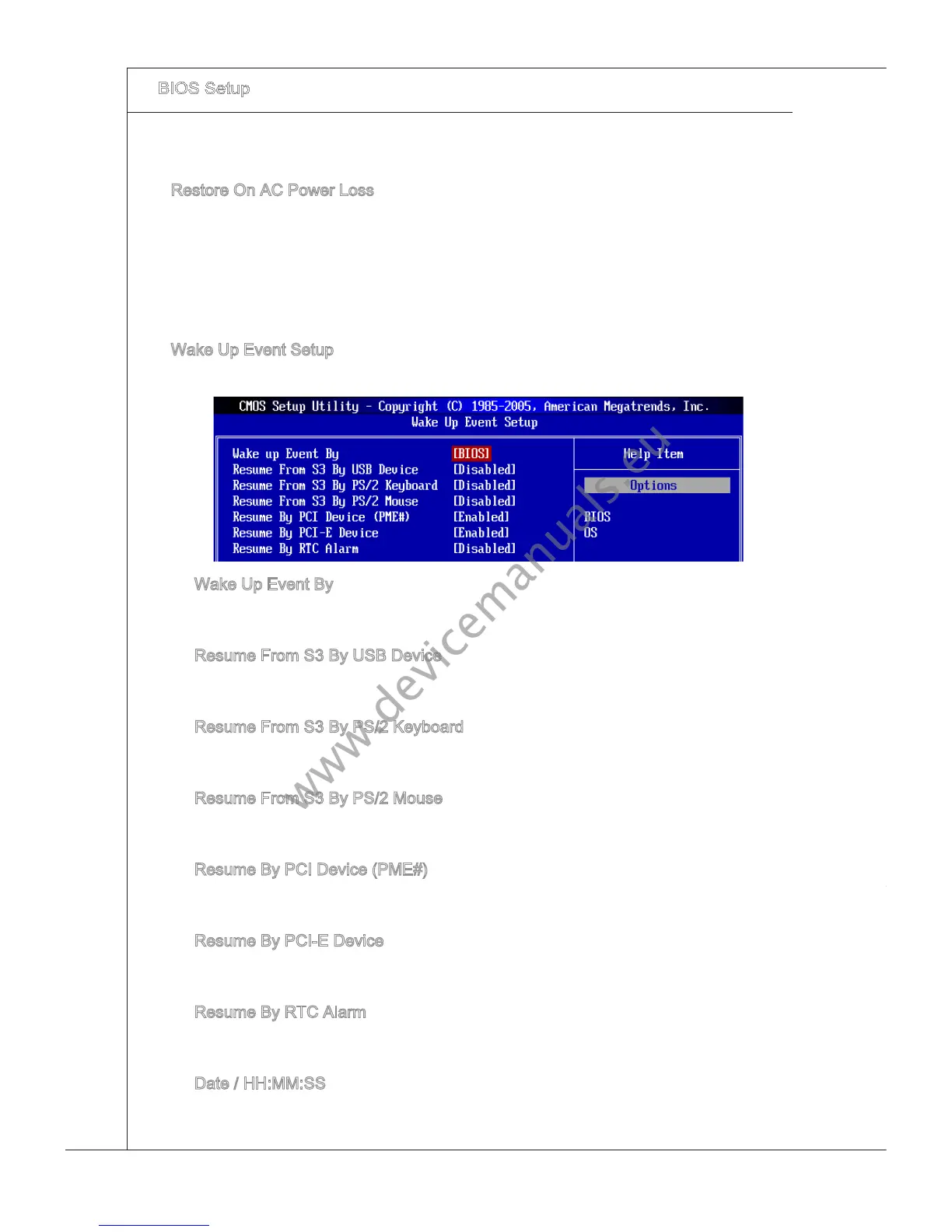
Wake Up Event Setup
Press <Enter> and the followng sub-menu appears.
▶
▶
Wake Up Event By
Settng to [BIOS] actvates the followng elds, and use the followng elds to set the
wake up events. Settng to [OS], the wake up events wll be dened by OS.
Resume From S3 By USB Devce
The tem allows the actvty of the USB devce to wake up the system from S3 (Sus-
pend to RAM) sleep state.
Resume From S3 By PS/2 Keyboard
Ths settng determnes whether the system wll be awakened from what power sav-
ng modes when
nput sgnal of the PS/2 keyboard s detected.
Resume From S3 By PS/2 Mouse
Ths settng determnes whether the system wll be awakened from what power sav-
ng modes when
nput sgnal of the PS/2 mouse s detected.
Resume By PCI Devce (PME#)
When set to [Enabled], the feature allows your system to be awakened from the
power savng modes through any event on PME (Power Management Event).
Resume By PCI-E Devce
When set to [Enabled], the feature allows your system to be awakened from the
power savng modes through any event on PCIE dev
ce.
Resume By RTC Alarm
The eld s used to enable or dsable the feature of bootng up the system on a
scheduled tme/date.
Date / HH:MM:SS
These two elds can specfy the date/ tme for power-on by alarm.
▶
▶
▶
▶
▶
▶
▶
▶



 To Next Page