3-13
BIOS Setup
▍
MS-7609
power ManageMent Setup
Important
S3-related functons descrbed n ths secton are avalable only when your BIOS sup-
ports S3 sleep mode.
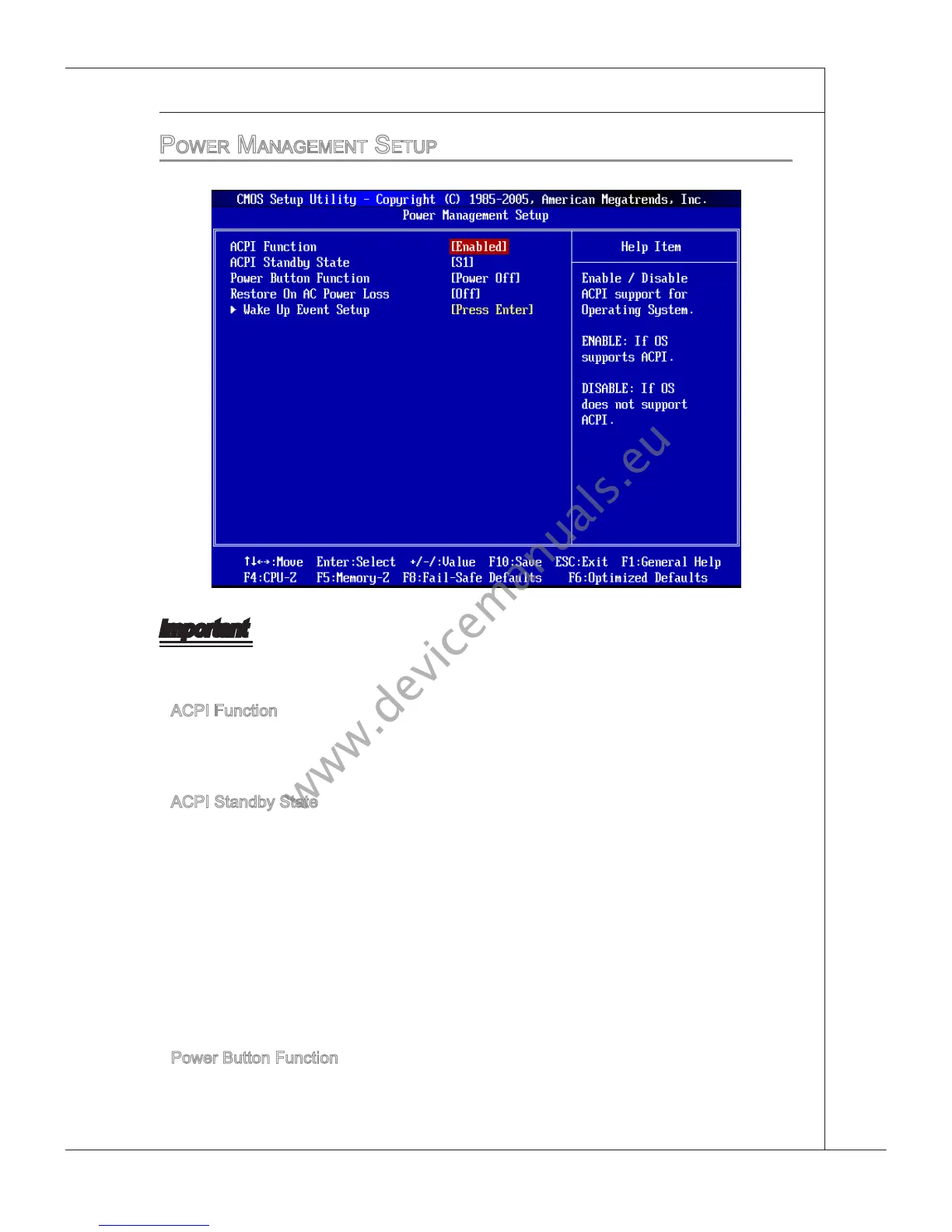
ACPI Functon
Ths tem s to actvate the ACPI (Advanced Conguraton and Power Management In-
terface) Funct
on. If your operatng system s ACPI-aware, such as Wndows 2000/XP,
select [Enabled].
ACPI Standby State
Ths tem speces the power savng modes for ACPI functon. If your operatng system
supports ACPI, such as Wndows 2000/ XP , you can choose to enter the Standby mode
n S1(POS) or S3(STR) fashon through the settng of ths eld. Settngs are:
[S1] The S1 sleep mode s a low power state. In ths state, no system
context s lost (CPU or chpset) and hardware mantans all system
context.
[S3] The
S3 sleep mode s a lower power state where the n formaton of
system conguraton and open applcatons/les s saved to man
memory that remans powered whle most other hardware compo-
nents turn o
to save energy. The nformaton stored n memory wll
be used to restore the system when a “wake up” event occurs.
Power Button Functon
Ths feature sets the functon of the power button. Settngs are:
[Power O] The power button functons as normal power o button.
[Suspend] When you press the power button, the computer enters the sus
-
▶
▶
▶



 To Next Page